With the 2022 revised curriculum, the number of subjects has increased, and as a result we now have to rewrite the assessment plan every semester.
The problem is that the assessment plan formally requires you to fill in every single achievement standard, achievement level, etc. for each unit.
These standards are not something the teacher writes themselves; they’re just simple copy-and-paste.
So after organizing this information in a table, I decided to automatically merge it using the FILTER and TEXTJOIN functions in Excel or Google Sheets.
1. Building an achievement level database
You can obtain the achievement levels for each elective subject from the KICE student assessment support portal below.
In the top menu, go to [Elementary/Middle/High] -> [Curriculum Achievement Standards] -> [Achievement Standards Data Room], search, then download the data.
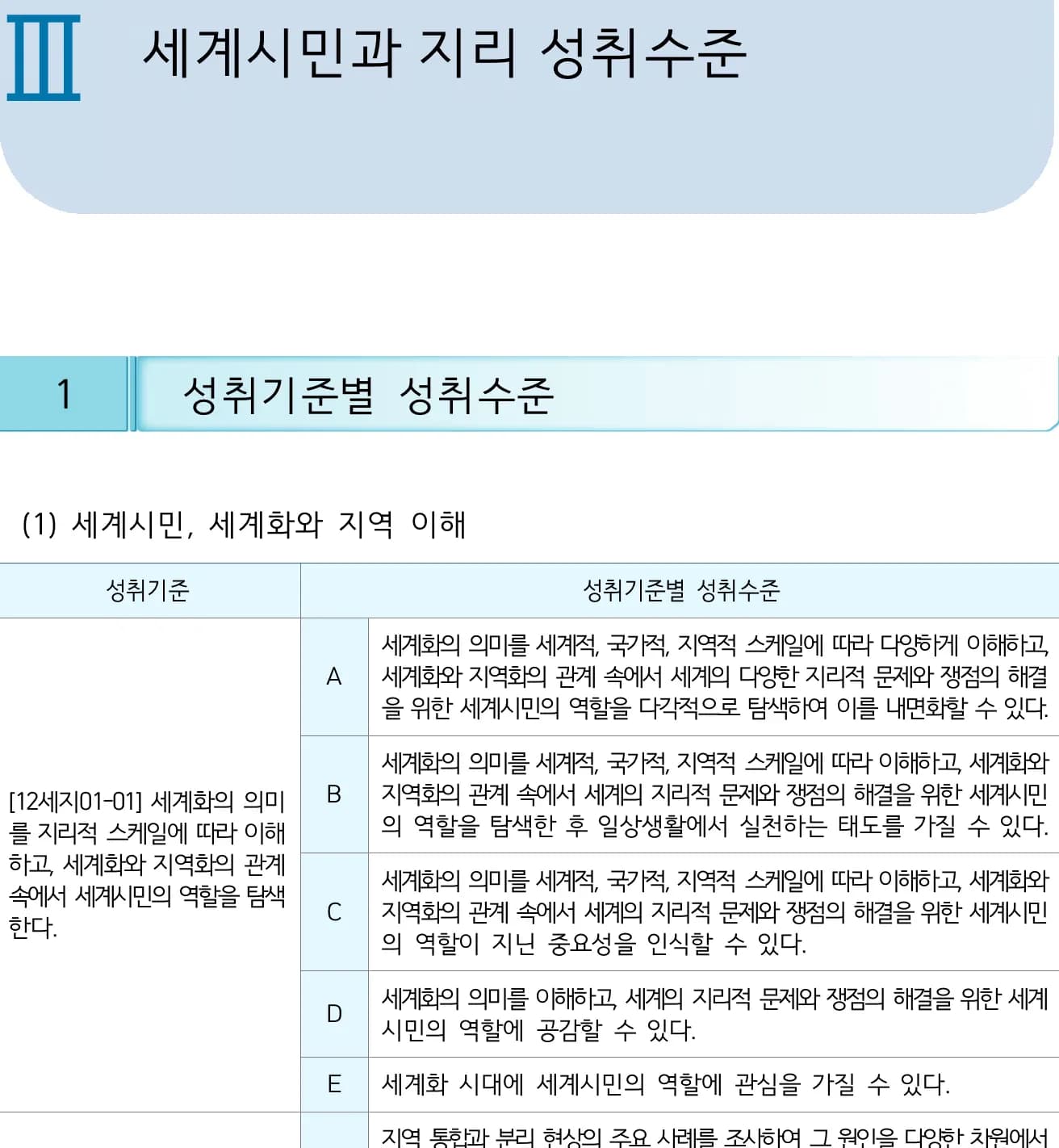
For example, the achievement levels for Global Citizenship and Geography look like the following.
The problem is that there are at least 15 achievement standards, and you have to copy the achievement levels for each one and combine them from A to E.
Now let’s turn this data into a table.
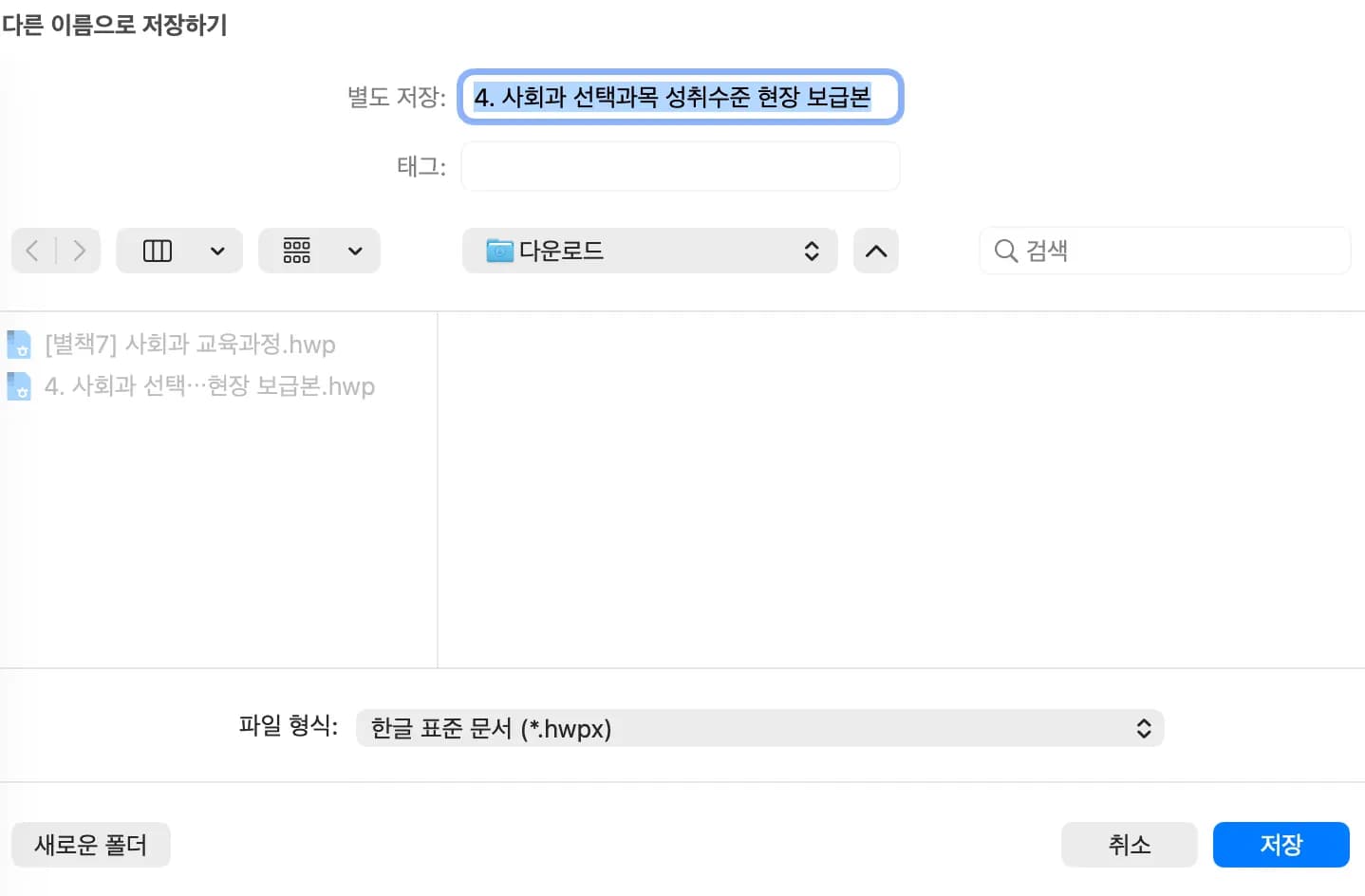
First, convert the hwp file to an hwpx file.
The hwpx file stores its internal structure as XML data, which allows other programs to parse its contents.
Then use Python to extract the tables inside the hwpx file.
Of course, I got help from chatGPT for the code below.
Since an hwpx file has a zip + XML structure, you can read the internal XML with Python and extract the tables.
// 이 코드는 생성형 AI를 이용해 제작한 코드입니다.

import zipfile
import xml.etree.ElementTree as ET
from openpyxl import Workbook

hwpx_path = "사회과 선택과목 성취수준 현장 보급본.hwpx"
xlsx_path = "output.xlsx"


def tag_name(elem):
    return elem.tag.split("}")[-1]


def collect_text(node):
    texts = []

    # tc 내부에 중첩 tbl이 있으면 그 하위 텍스트는 제외한다.
    stack = [node]
    while stack:
        cur = stack.pop()

        if cur is not node and tag_name(cur) == "tbl":
            continue

        if tag_name(cur) == "t" and cur.text:
            t = cur.text.strip()
            if t:
                texts.append(t)

        children = list(cur)
        stack.extend(reversed(children))

    return "\n".join(texts)


def is_title_like(text):
    if not text:
        return False

    compact = text.replace(" ", "")

    # 표 전체 내용을 붙여 놓은 긴 문장은 제목으로 취급하지 않는다.
    if len(text) > 80:
        return False

    # 표 헤더/본문 키워드가 포함되면 제목 행으로 넣지 않는다.
    if "성취기준" in compact and "성취수준" in compact:
        return False

    return True


wb = Workbook()
ws = wb.active
ws.title = "tables"

saved_table_count = 0
current_row = 1

with zipfile.ZipFile(hwpx_path, "r") as z:
    section_files = sorted(
        name for name in z.namelist()
        if name.startswith("Contents/section") and name.endswith(".xml")
    )

    for section_file in section_files:
        xml_data = z.read(section_file)
        root = ET.fromstring(xml_data)

        elems = list(root.iter())

        for i, elem in enumerate(elems):
            if tag_name(elem) != "tbl":
                continue

            tbl = elem

            prev_text = ""
            for j in range(i - 1, -1, -1):
                if tag_name(elems[j]) != "p":
                    continue

                texts = []
                for x in elems[j].iter():
                    if tag_name(x) == "t" and x.text:
                        t = x.text.strip()
                        if t:
                            texts.append(t)

                candidate = " ".join(texts)
                if not candidate:
                    continue

                if is_title_like(candidate):
                    prev_text = candidate
                    break

            table_rows = []
            for tr in tbl:
                if tag_name(tr) != "tr":
                    continue

                row_values = []
                for tc in tr:
                    if tag_name(tc) != "tc":
                        continue
                    row_values.append(collect_text(tc))

                if row_values:
                    table_rows.append(row_values)

            if not table_rows:
                continue

            preview_text = "".join(table_rows[0])

            # 1행 1셀 같은 요약성/오검출 표는 제외한다.
            has_enough_shape = len(table_rows) >= 2 and any(len(r) >= 2 for r in table_rows)

            if "성취기준별" in preview_text and "성취수준" in preview_text and has_enough_shape:
                saved_table_count += 1

                table_title = prev_text if is_title_like(prev_text) else ""

                for row_values in table_rows:
                    # 1열에는 표 제목을 두고, 실제 표 데이터는 오른쪽(2열부터) 배치한다.
                    ws.cell(row=current_row, column=1, value=table_title)

                    first_value = row_values[0].strip() if row_values and isinstance(row_values[0], str) else ""
                    start_col = 3 if first_value in {"B", "C", "D", "E"} else 2

                    for col_idx, value in enumerate(row_values, start=start_col):
                        ws.cell(row=current_row, column=col_idx, value=value)

                    # 오른쪽으로 밀린(B/C/D/E) 행은 표의 첫 번째 열(2열)을 바로 윗행 값으로 채운다.
                    if start_col == 3 and current_row > 1:
                        ws.cell(row=current_row, column=2, value=ws.cell(row=current_row - 1, column=2).value)

                    current_row += 1

                # 표 사이 한 줄 띄우기
                current_row += 2

if saved_table_count == 0:
    ws["A1"] = "조건에 맞는 표를 찾지 못했습니다."

wb.save(xlsx_path)
print(f"완료: {saved_table_count}개 표를 하나의 시트에 저장")
This way the internal tables are extracted as shown below.
Even after doing this, if there are tables that still don’t come out properly, just manually clean up the data a bit.
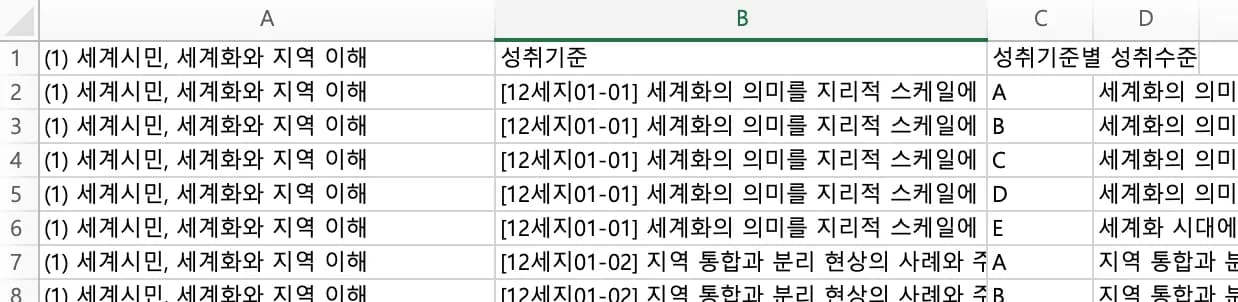
In Excel I simply used filters and Text to Columns to separate the achievement standard code, content, and achievement levels by standard.
If I normalized this, the performance would improve, but it would be harder for people to check, so I decided to just leave the duplicate columns.
And after putting this together, I even wondered if I should have just filed a request to publicly disclose the database.
2. Creating the spreadsheet
In most schools, the assessment plan includes the achievement codes and achievement standards that correspond to each week.
So I figured that if you could just select the achievement codes for each month and have everything auto-filled, entering the assessment plan would become much easier.
In the spreadsheet I used the filter and unique functions to combine the subject, unit, and achievement codes I wanted to enter.
If this feels difficult, I highly recommend building it together with an AI.
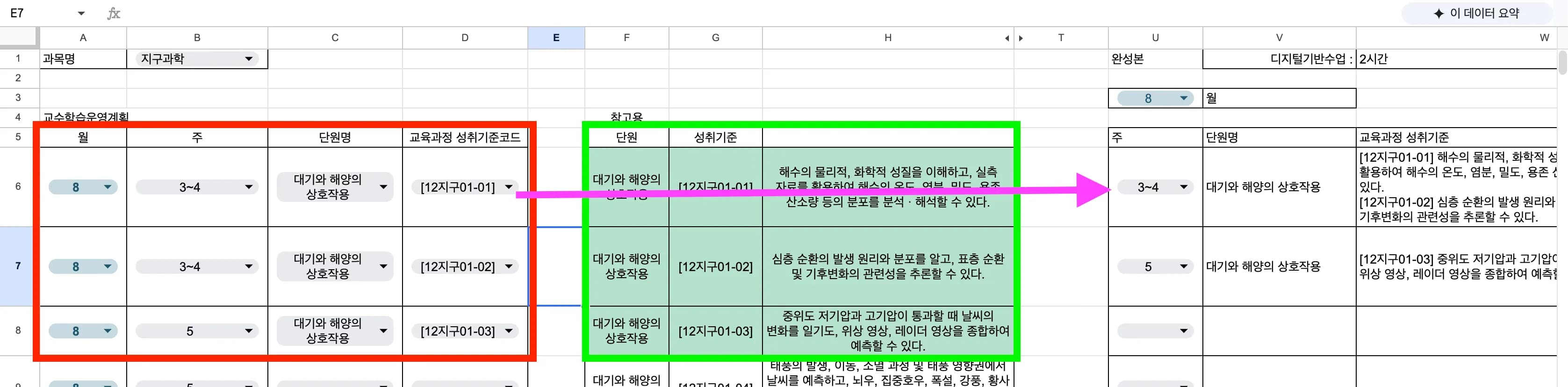
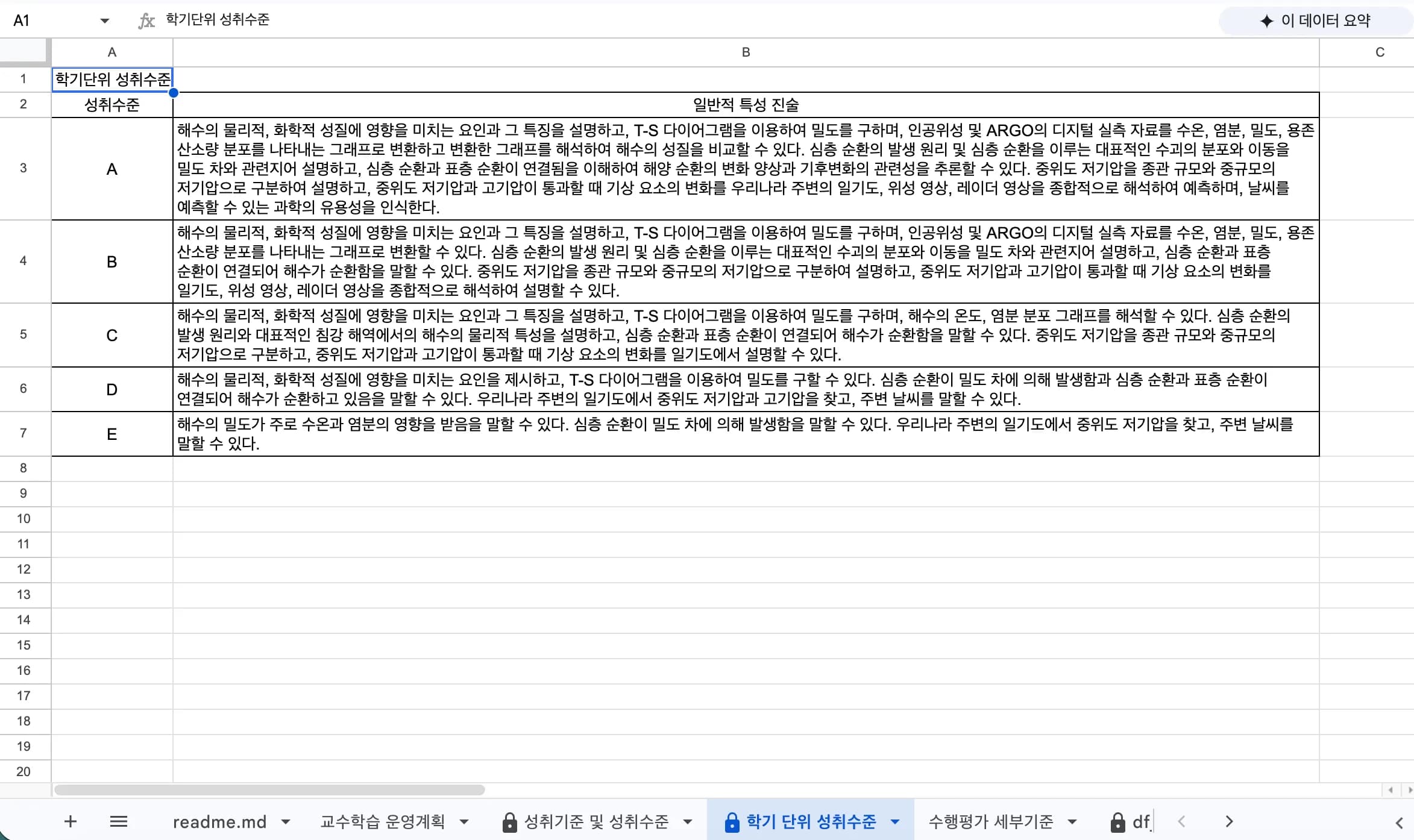
On the first tab, once you enter the month, week, unit name, and achievement standard code, you can simply copy what appears on the far right.
The green box in the middle is there so I can double-check the achievement standards I’ve entered.
By making these selections, the achievement standards and achievement levels for each unit, as well as the semester-level achievement levels, are all automatically completed.
In fact, for typical subjects, all achievement standards are included in the assessment plan, so you could just dump them all in, but I created this with curriculum reconstruction in mind.
I’m also thinking about adding a sheet that simply merges all A–E levels.
And I created another sheet for performance assessments.
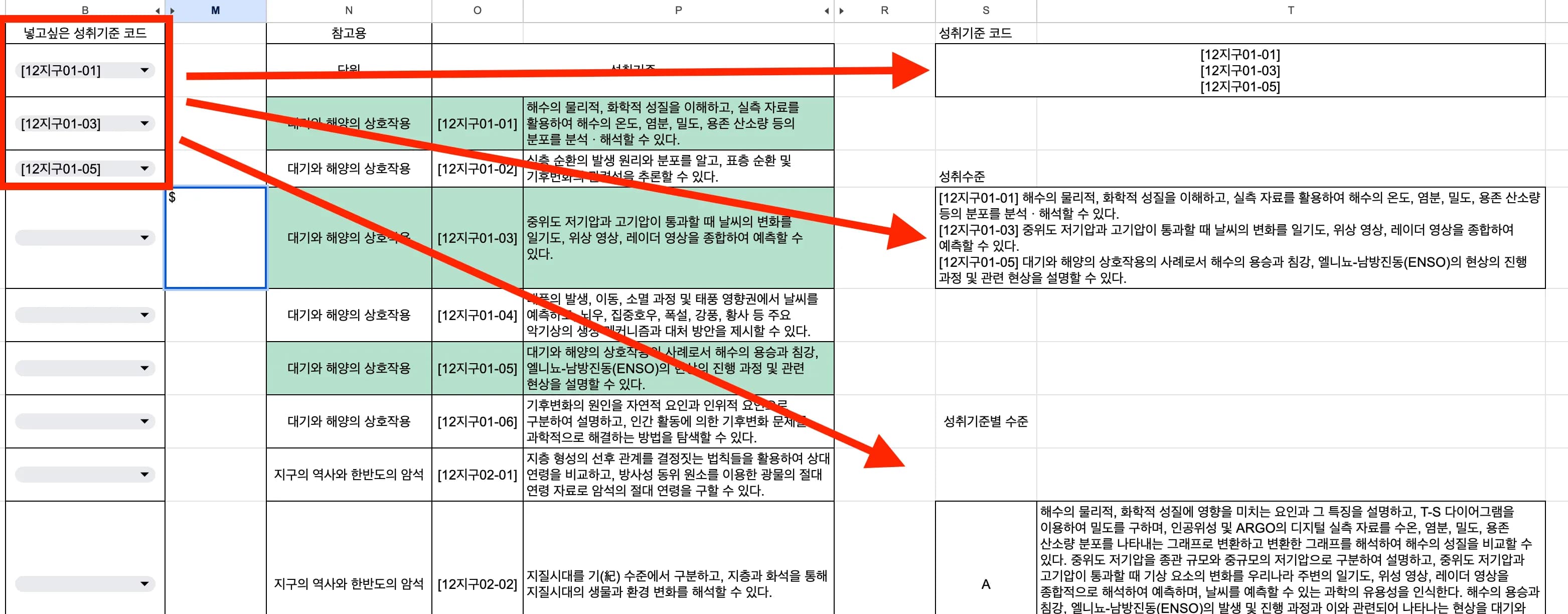
When I enter the achievement standard codes I want to use for performance assessment, it combines the A–E levels so they can go straight into the assessment plan.
What we need to be thinking about is not copying and pasting, but what kinds of actual assessments should take place.
3. Impressions from use

Unfortunately, even though many teachers pour time into their assessment plans, nobody in the classroom is actually curious about the sentences describing achievement levels.
That’s because the assessment itself, as implemented according to the plan, is more important than the plan document.
If you ask graduates from the period when we started putting achievement standards into assessment criteria what those achievement standards were, I can say with confidence that none of them will remember.
So I would say that putting these kinds of sentences into assessment criteria is nothing more than a meaningless formality.
The educational reality in schools is not static like achievement codes or achievement standards, but dynamic.
I feel that we need more time to reflect not on the bureaucratic quality of the assessment plan as an official document but on the qualitative issues of the assessment itself.
I’ll probably only be able to post a proper review after I actually use this in July–August.
When I shared this spreadsheet with the teacher in the next seat, they were happy and said it felt like they could draft the second semester assessment plan right away.
I think it will probably be quite helpful.




댓글을 불러오는 중...