While searching to use a subdomain, I realized that not only the hosting server but also the server side needed to be configured.
First, you register an A or CNAME record with the hosting service.
Then, when the request reaches the computer, it forwards the port based on the header's host according to the reverse proxy settings.
First, I’ll describe what I learned about what a proxy and a reverse proxy are.

1. Proxies and Reverse Proxies
1. What is a proxy?
A proxy means 'agent' or 'substitute'.
Proxies serve as intermediary servers from the user's perspective.
When a user sends a request to a proxy, the proxy receives the required content from the actual destination desired by the user, then receives the response and forwards it to the user.
This is similar to using a convenience store for package delivery.
Our delivery destination isn’t the convenience store, but the shipping company.
When you leave mail at the convenience store, they pass it on to the shipping company on your behalf and return the response.
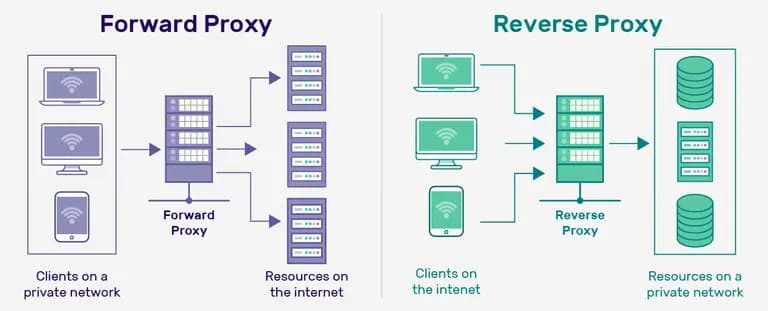
2. Reverse Proxy
If a proxy forwards requests from the client to an external server, a reverse proxy handles distribution within internal servers.
If the process of sending mail to the shipping company was a proxy, the process of distributing shipments to each home is a reverse proxy.
The flow is the exact opposite, hence the name reverse.
What I want to do is create subdomains and distribute ports of the internal server according to the host name included in the request header, which involves a reverse proxy.
2. nginx Migration Process
The process was simpler than expected.
nginx installation -> remove server.js and restore nextjs's package.json
    -> change nginx.conf -> start nextjs, nginx
It took about 15~20 minutes while asking ChatGPT for help when needed.
It seems coding is something you just dive into, even without much knowledge.
3. Detailed Process
1. Installing nginx
I always think this is why I use a MacBook.
If Homebrew is installed, the setup is just a breeze without any hassle.
Then, quickly register the service.
brew install nginx
brew services start nginx
2. Remove server.js and Restore package.json
The function of the server previously used is as follows.
You can just delete it, but I backed it up just in case.
const https = require("https");
const http = require("http");
const { parse } = require("url");
const next = require("next");
const fs = require("fs");

const dev = process.env.NODE_ENV !== "production";
const PORT_HTTPS = 8000;
const PORT_HTTP = 3000;
const hostname = "localhost"; // or custom domain
const app = next({ dev, hostname, PORT: PORT_HTTPS });
const handle = app.getRequestHandler();

const httpsOptions = {
  key: fs.readFileSync(
    "path to privkey",
    "utf8"
  ), // Read the issued SSL certificate key with "readFileSync"
  cert: fs.readFileSync(
    "path to fullchain",
    "utf8"
  ),
};

async function startServer() {
  try {
    await app.prepare();

    const httpsServer = https.createServer(httpsOptions, (req, res) => {
      const parsedUrl = parse(req.url, true);
      handle(req, res, parsedUrl);
    });

    httpsServer.listen(PORT_HTTPS, () => {
      console.log(`> Ready on https://${hostname}:${PORT_HTTPS}`);
    });


    const httpServer = http.createServer((req, res) => {
      res.writeHead(301, { Location: `https://${req.headers.host}${req.url}` });
      res.end();
    })
    httpServer.listen(PORT_HTTP, () => {
      console.log(`> Ready on http://${hostname}:${PORT_HTTP}`);
    })
  } catch (err) {
    console.error("Error starting the server:", err);
  }
}

startServer();
Then, I changed the script section in package.json as follows.
"scripts": {
    "dev": "nodemon server.js",
    "build": "next build",
    "start": "NODE_ENV=production nodemon server.js",
    "lint": "next lint",
},"scripts": {
"dev": "next dev",
"build": "next build",
"start": "next start",
"lint": "next lint",
},After doing this, running sudo yarn dev automatically starts the server at http://localhost:3000.
Now that the basic setup is complete, let's tweak nginx.
3. Changing nginx.conf
ChatGPT suggested editing the conf file with nano like this, but I couldn't stand it.
nano /opt/homebrew/etc/nginx/nginx.confI went into that path and opened the file with VSCode.
Then I erased all the existing content and pasted what ChatGPT provided.
Please refer to the comments for details.
# The number of processors is automatic. If load is low, 1 is fine.
# In events, the number of connections is the number to be handled.
# Processor count * connection count = the number of simultaneous connections possible.
worker_processes auto;
events {
    worker_connections 1024;
}

# Handles HTTP requests. Can handle various types such as mail{}, stream{}, etc.
http {
    # Automatically specifies MIME type according to file extension.
    include       mime.types;
    # Virtual host settings to specify server configuration
    include /opt/homebrew/etc/nginx/sites-enabled/*;
    # Default MIME type to use if MIME settings are unknown
    default_type  application/octet-stream;
    # Uses OS kernel features to enhance file transmission. Used for serving static files.
    sendfile        on;
    # Time to keep connection alive with the client. Improves server performance by reducing unnecessary TCP connections.
    keepalive_timeout 65;

    # Put server block in here.
    # First, redirect HTTP requests to HTTPS
    server {
        listen 80;
        server_name www.earthscience.kr earthscience.kr;
        return 301 https://$host$request_uri;
    }
    # Second, HTTPS requests including SSL certificate, key location, etc.
    server {
        listen 443 ssl;
        server_name www.earthscience.kr earthscience.kr;

        ssl_certificate /etc/letsencrypt/live/www.earthscience.kr/fullchain.pem;
        ssl_certificate_key /etc/letsencrypt/live/www.earthscience.kr/privkey.pem;

        location / {
            proxy_pass http://localhost:3000;
            proxy_http_version 1.1;
            proxy_set_header Upgrade $http_upgrade;
            proxy_set_header Connection 'upgrade';
            proxy_set_header Host $host;
            proxy_cache_bypass $http_upgrade;
        }
    }
}
4. Starting nextjs and nginx
Now all that’s left is to build the files in nextjs -> start the server, and then run nginx.
sudo yarn build
sudo yarn start
sudo nginx # if nginx hasn’t started yet
4. Reflections
When I first heard about nginx, I hesitated due to the pressure of potentially having to learn a new language.
But in reality, it’s much easier than configuring server.js.
It seems programming is indeed something you start and learn as you go.
However...
While searching for memes, I found something called Caddy that is said to be better than nginx?
Looks like another journey is about to start.







댓글을 불러오는 중...