Every time I wanted to add something to my homepage, I’d run a build, and it seems there were always a few people trying to access the site in the meantime.
As a result, the score in Search Console started dropping bit by bit.
I figured I couldn’t leave it like this, so I started looking into how to do zero-downtime deployments.

1. Two project folders + two terminals
The answer turned out to be surprisingly simple: just open two terminals.
You run the build in one terminal, while the server keeps running in the other.
The problem is that if you open two terminals within a single project, they conflict with each other.
Even if one is running fine, the moment you run a build in the other terminal, the .next folder gets recreated, causing internal errors and ultimately bringing the site down.
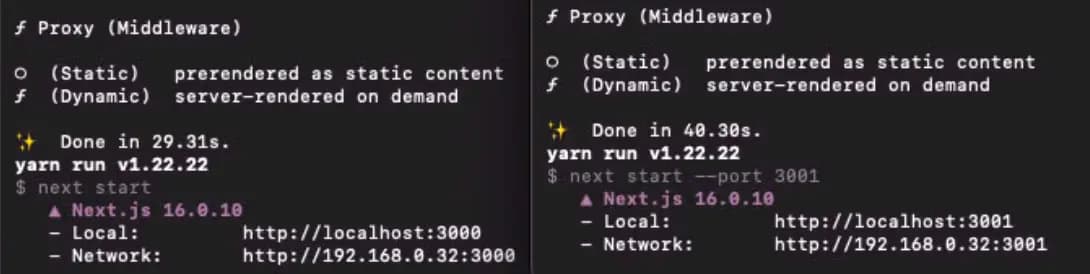
So you need another folder that’s an exact copy of the existing project.
Since I was storing all images locally as well, I modified the copied project (called blogCopy) so that it points to the original folder.
Now all that’s left is tweaking Caddy.
2. Caddy official documentation
ChatGPT and Claude didn’t seem to know this well either; they just kept spitting out weird suggestions, so I ended up going straight to the official docs.
The example in the official documentation looked like this:
example.com {
	reverse_proxy node1:80 node2:80 node3:80 {
		health_uri /healthz
		lb_try_duration 5s
	}
}
But this distributes requests evenly across three nodes, which wasn’t what I needed.
The AI assistants kept insisting on something like the following, but when I put it in, the reverse proxy just stopped working.
example.com {
    reverse_proxy localhost:3000 localhost:3001 {
        health_uri /health
        health_interval 5s
        health_timeout 2s
        health_status 200
    }
}
The first problem here is that it doesn’t define which port should be primary.
And because Caddy checks the ports every 5 seconds, you can’t reliably reach the correct port until 5 seconds have passed after it starts.
So I decided to just configure it manually.
example.com {
	reverse_proxy localhost:3000 localhost:3001 {
		lb_policy first

   		fail_duration 20s
   		max_fails 2
	}
}
I changed it to a setup where it simply detects failed connections from users and then switches ports.
With this, it works just fine.
3. Thoughts
Now I can run builds as much as I want(?).
Sometimes when a build failed with an error, I’d get nervous that I was leaving the server down for too long.
That shouldn’t happen anymore.
I’m learning new things every day, and it’s fascinating that there’s always something more to learn.






댓글을 불러오는 중...