Recently I started thinking that my blog needed multilingual support.
So I decided to implement a multilingual service using next-intl.
1. i18n
First, there are some principles you need to follow when building a multilingual service.
This is called internationalization, but since the word is very long, we take the first letter i and the last letter n, and the 18 letters in between, and call it i18n.
1) Principles of i18n
(1) No hardcoding of strings
Never hardcode strings like "Sign up" directly in the code; always retrieve them via message keys.
For example, let’s say you’re building the main page of a blog.
You could write it like this:
// components/Header.tsx
export function Header() {
  return (
    <header>
      <h1>지구과학 블로그</h1>
      <button>로그인</button>
      <button>회원가입</button>
    </header>
  );
}
If you hardcode strings, you’ll have to create separate components for each language.
Instead, it’s better to prepare locale- and region-specific resources so you can change things in one place.
Prepare separate resources like ko.ts for Korean and en.ts for English.
Of course, you can also use JSON.
// locales/ko.ts
export const ko = {
  header: {
    title: '지구과학 블로그',
    login: '로그인',
    signup: '회원가입',
  },
};

// locales/en.ts
export const en = {
  header: {
    title: 'Earth Science Blog',
    login: 'Log in',
    signup: 'Sign up',
  },
};
Call these values according to the locale so that the language can change dynamically.
(2) Using parameters and supporting plurals
Content like "안녕하세요 힘캥님" should be managed in the form `안녕하세요, ${name}님` so that only the name changes.
Also, in English, singular and plural are distinguished like 1 comment and 2 comments, so this needs to be handled at the message level.
// locales/ko.ts
export const ko = {
  greeting: '안녕하세요, {name}님',
  comments: {
    zero: '아직 댓글이 없습니다.',
    one: '댓글이 1개 있습니다.',
    other: '댓글이 {count}개 있습니다.',
  },
};

// locales/en.ts
export const en = {
  greeting: 'Hello, {name}',
  comments: {
    zero: 'No comments yet.',
    one: 'There is 1 comment.',
    other: 'There are {count} comments.',
  },
};
(3) Locale-specific formatting of dates/numbers/currency
Each country has different ways of expressing dates and numbers.
For example, November 27, 2025 can be written as 2025-11-27, but it can also be written as 27/11/2025.
(4) Locale negotiation and default fallback
Check the browser language, URL, cookies, etc. first, and if no supported language is found, set defaultLocale.
(5) Separation of translation and code
Developers do not translate text; they only use keys.
Translators should manage text only via JSON or a separate tool.
2. next-intl
Among several libraries, next-intl both meets the above i18n conditions and is widely used.
So I decided to apply it to my blog as well.
First, install the library.
yarn add next-intlThen create an i18n/config.ts file in the root folder.
// i18n/config.ts
export const defaultLocale = 'ko';
export const locales = ['ko', 'en', 'ja'] as const;
export type Locale = (typeof locales)[number];
And create a function in i18n/request.ts to retrieve messages in server components.
// i18n/request.ts
import { getRequestConfig } from 'next-intl/server';
import { defaultLocale } from './config';

export default getRequestConfig(async ({ requestLocale }: { requestLocale: Promise<string | undefined> }) => {
  const locale = await requestLocale || defaultLocale;
  return {
    locale,
    messages: (await import(`./message/${locale}.json`)).default,
  };
});
Then create a messages folder and create a JSON file for each language.
If there is no JSON file for a given language, an error will occur when accessing the site.
/messages
  ├── ko.json
  ├── en.json
  └── ja.json
These files must all share the same internal structure.
If you want to torment developers, make them different.
// ko.json
{
  "Home": {
    "title": "지구과학 블로그",
    "readMore": "더보기"
  }
}

// en.json
{
  "Home": {
    "title": "Earth Science Blog",
    "readMore": "Read more"
  }
}
Now it’s time to create the [locale] folder.
With the App Router, it’s natural to put the locale at the top-level path.
You can exclude paths like api or other routes that don’t require a locale.
app
 ├── [locale]
 │     ├── layout.tsx
 │     ├── page.tsx
 │     └── ... (other routes)
 └── layout.tsx
In the main layout.tsx you can set whatever configuration you want.
In [locale]/layout.tsx, configure it so that the locale can be used as follows.
// app/[locale]/layout.tsx
import { NextIntlClientProvider, getMessages } from 'next-intl';
import { locales } from '@/i18n/config';
import { notFound } from 'next/navigation';

export default async function LocaleLayout({ children, params }) {
  const { locale } = params;

  if (!locales.includes(locale)) {
    notFound(); // 404 handling
  }

  const messages = await getMessages();

  return (
    <html lang={locale}>
      <body>
        <NextIntlClientProvider messages={messages} locale={locale}>
          {children}
        </NextIntlClientProvider>
      </body>
    </html>
  );
}
Here, the getMessages() function loads messages according to the locale and passes them down via the provider.
This allows child components to use messages according to the locale.
Let’s look at an example of how to use it.
// Server component
import { getTranslations } from 'next-intl/server';

export default async function Page() {
  const t = await getTranslations('Home');

  return <h1>{t('title')}</h1>;
}

// Client component
'use client';

import { useTranslations } from 'next-intl';

export default function ReadMoreButton() {
  const t = useTranslations('Home');

  return <button>{t('readMore')}</button>;
}
In server components you can use getTranslations, and in client components you can use useTranslations.
You can also use this approach to change values according to the locale in metadata.
// app/[locale]/posts/[slug]/page.tsx
import { getTranslations } from 'next-intl/server';

export async function generateMetadata({ params }) {
  const t = await getTranslations({ locale: params.locale, namespace: 'Post' });

  return {
    title: t('metaTitle'),
    description: t('metaDescription')
  };
}
2. Changing the DB schema
Up to this point, the difficulty wasn’t that high.
At least, not until I realized I had to change the DB.
The DB schema I had been using looked like this:
model Post {
  id               String          @id @default(cuid())
  title            String
  processedContent String?         // processed content for rendering
  thumbnail        String?
  createdAt        DateTime        @default(now())
  updatedAt        DateTime?
  likes            Int             @default(0)
  categoryId       String?
  ....
}
If I wanted all locales to share likes and views, I needed to split out processedContent and create another table based on locale.
Putting content for every locale directly into the Post itself would make the table too big and wouldn’t conform to normal forms.
Changing the schema itself wasn’t particularly hard, but once I separated content from the post, I had to change all of my site’s functions for writing, viewing, and paginating posts.
So I decided to change it gradually.
// Keep Post as-is
model Post {
  ....
}

model PostLocale {
  id               String   @id @default(cuid())
  postId           String
  locale           String
  title            String
  excerpt          String
  content          String
  ...

  post Post @relation(fields: [postId], references: [id], onDelete: Cascade)
}
Since the two tables are tied with a relation, you can just return posts differently using postId and locale.
To minimize component changes, I made the output types of the existing post retrieval function and the new locale-based post retrieval function the same.
export async function getLocalizedPostBySlug(
  slug: string,
  locale: string
): Promise<PostContentProps | null> {
  // Retrieve the post
  const basePost = await getPostBySlug(slug);
  // Retrieve the locale-specific post based on the retrieved post
  const localeEntry = await prisma.postLocale.findFirst({
    where: {
      postId: basePost.id as string,
      locale,
    },
  });

  const localizedContent = localeEntry.processedContent || localeEntry.content;
  // Return the retrieved content
  return {
    ...basePost,
    title: localeEntry.title,
    excerpt: localeEntry.excerpt,
    category: localeEntry.category ?? basePost.category,
    content: localeEntry.content,
  };
}
Then I applied this logic to post retrieval as well.
export default async function PostPage({
  params,
}: {
  params: Promise<{ slug: string }>;
}) {
  const { slug } = await params;
  const locale = await getLocale();
  const post =
    locale !== "ko"
      ? await getLocalizedPostBySlug(slug, locale)
      : await getPostBySlug(slug);
  ...
}
Now all that’s left is to translate the posts and insert them into the DB.
3. Translation using the Vercel AI SDK
I could have implemented this in Python, but I wanted to use pure TypeScript, so I decided to use the Vercel AI SDK.
Using something called Generate Text, you can get generated content via an API.
import { PrismaClient } from "@prisma/client";
import { generateText } from "ai";
import { openai } from "@ai-sdk/openai";

const prisma = new PrismaClient();

const TARGET_LOCALES = ["en", "zh", "ja", "es"] as const;

async function translatePost(post: {
  id: string;
  title: string;
  content: string;
}) {
  ...
  // Retrieve the post
  for (const locale of TARGET_LOCALES) {
    const exists = await prisma.postLocale.findUnique({
      where: {
        postId_locale: {
          postId: post.id,
          locale,
        },
      },
    });
    // Predefine the output format
    const payload = JSON.stringify({
      targetLocale: locale,
      title: post.title,
      content: post.content,
    });

    const { text } = await generateText({
      model: openai("gpt-5.1"),
      // Prompt settings
      system:
        "You are a professional translator. Translate the JSON fields `title` and `content` into `targetLocale`. Preserve HTML tags, Markdown, code blocks, links, and inline styles exactly as-is; only translate the human-readable text. Keep technical terms and product names unless a well-known localized form exists. Return the translated JSON with the same keys and no extra commentary.",
      prompt: payload,
    });
    // Since there are characters like ''' in text, you need escaping when actually using this.
    const json = JSON.parse(text);

    await prisma.postLocale.create({
      data: {
        postId: post.id,
        locale,
        title: json.title || post.title,
        content: json.content || post.content,
        category: json.category || null,
        // Omitted fields
      },
    });
    results[locale] = json;
  }
  return results;
}
It felt like it took over an hour to translate about 170 posts into four languages.
The total API cost came out to 16.69 dollars.
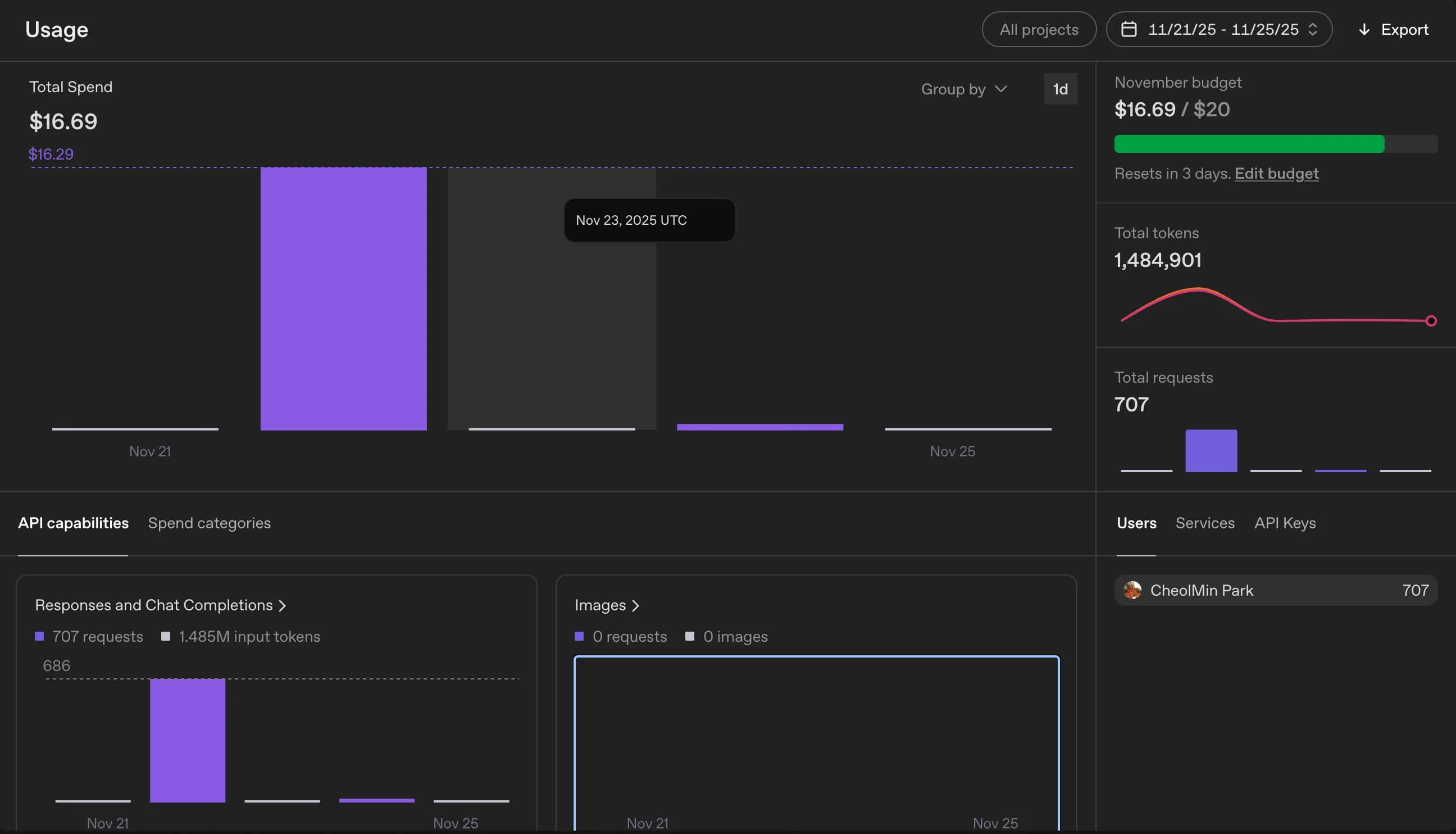
Converted, that’s about 24,000 KRW.
I used GPT-4o, but considering the expected translation quality, it doesn’t feel too bad.
4. Registering sitemap.xml
Finally, you just need to update sitemap.xml.
I thought I’d have to create separate sitemaps for each language, but it turns out it’s common practice to list everything in the sitemap of the main domain.
I registered the sitemap roughly based on the posts that had been published.
...
export default async function sitemap(): Promise<MetadataRoute.Sitemap> {
  const posts = await prisma.post.findMany({
    where: { published: true },
    select: { id: true, slug: true, createdAt: true, updatedAt: true },
    orderBy: { updatedAt: "desc" },
  });

  const staticPages: MetadataRoute.Sitemap = locales.flatMap((locale) =>
    staticRoutes.map(({ path, changeFrequency, priority }) => ({
      url: buildLocalizedUrl(path, locale), // function I wrote
      lastModified: new Date(),
      changeFrequency,
      priority,
    }))
  );
...
5. Thoughts
I spent two months thinking about how to build a multilingual service, but in the end it took less than 2–3 days to actually implement it.
Once again, I felt that what really matters is to just try doing it.
This time I managed with a quick fix by adding one more table, but I realized that once you create a DB and build a service around it, changing it later is not easy.
I was reminded again of the importance of schema and DB design.
Next time I start another project, I’ll probably first go over the DB design with extra care.






댓글을 불러오는 중...