
One day, I suddenly encountered an issue where changing a component name in VS Code didn't automatically update the import path.
At first, I didn't think it was a big problem...
While trying to rename a button, I ended up checking every component and searched for a solution.
No matter how hard I looked, I couldn't find a solution...
Turns out, it's incredibly simple.
1. Solution
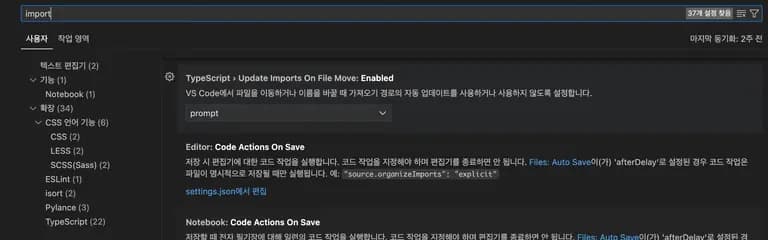
- Press cmd + , in VS Code (input ctrl + , in Windows/Linux environments)
- Search for imports in the top search bar
- Change Update Imports On File Move to prompt or always
2. Review
It's really simple, but I can't believe how many days I struggled because of this.
It was a reminder that while coding skills are important, knowing shortcuts and environment settings is also crucial for increasing productivity.






댓글을 불러오는 중...