After checking the blog with PageSpeed Insights, I found that it took a long time to load images.
I realized it was time for an image diet.
I originally used the webp format but discovered that AVIF offers higher compression rates, better compatibility, and even supports GIFs.
So, I decided to compare them.

After converting the png file to AVIF, the size was reduced by 10 times.
Two to three times is one thing, but 10 times is a lot.
I felt it had to be changed.

Using Python, it's possible to convert png to AVIF or vice versa.
First, install the necessary libraries using pip.
pip install pillow pillow_avif imageio
For now, my images are stored in paths like posts/[slug]/*.png.
Therefore, navigate to the path and convert all png files to AVIF.
from PIL import Image
import pillow_avif
import imageio
import pathlib

path = pathlib.Path.cwd()
# Check all files in the current path.
for folder in path.iterdir():
    if folder.is_dir():
        for file in folder.iterdir():
            # If it's a folder, check the files inside.
            # If the extension is jpg, png, etc., execute the conversion.
            if file.suffix in [".jpg", ".png", ".gif", ".PNG", ".JPG", ".jpeg", ".webp"]:
                img = Image.open(file)
                # If it's a gif file, it's definitely an animated image.
                # Save each image as a frame and convert.
                if file.suffix == ".gif" :
                    frames = []
                    frame_count = 0
                    try:
                        while True:
                            current_frame = img.convert('RGB')
                            frames.append(current_frame)
                            img.seek(img.tell() + 1)
                    except EOFError:
                        pass
                    imageio.mimsave(f'{file.parent}/{file.stem}.webp', frames, format='AVIF')
                # Otherwise, just convert and save the extension.
                else:
                    img.save(f'{file.parent}/{file.stem}.webp')
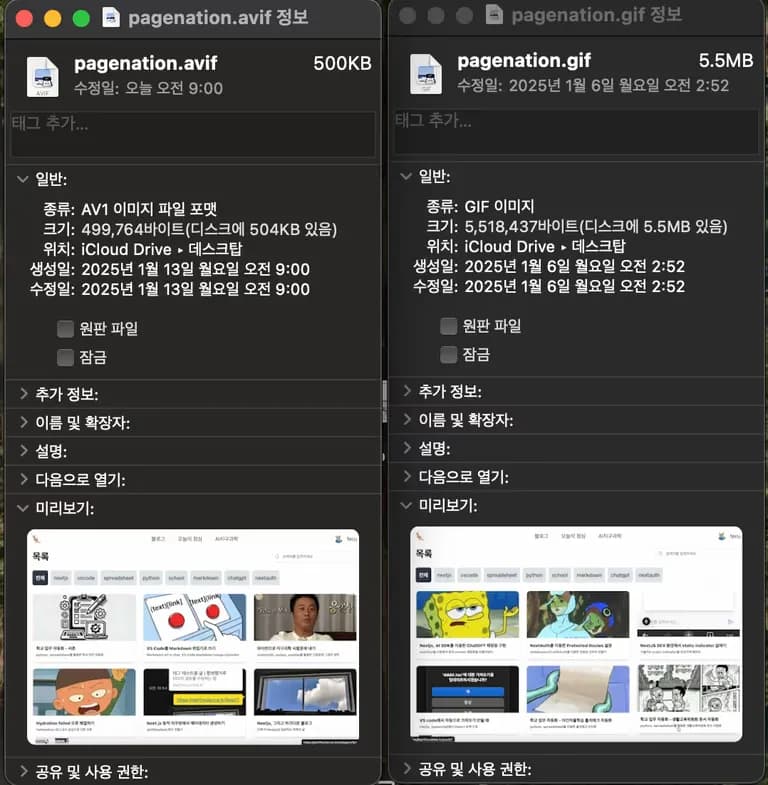
After conversion, a 5.5MB animated image became 500KB.
The compression rate is no joke.
Check the official Netflix blog for more on AVIF's performance.
The AVIF extension continues to be promoted by companies due to financial interests, so it will likely keep evolving.
Let's apply it to the blog and aim for SEO optimization as well.





댓글을 불러오는 중...