I've been writing café and restaurant blogs for a while, and it was too tedious to mosaic faces every time I uploaded photos.
Naver and Tistory also support automatic mosaics, but if you have 30 photos, you have to click each one, and the recognition rate wasn't great.
So I decided to just make it myself.
1. Folder Structure
The folder structure is as follows.
Inside the folder called 'masaic', there are folders and photos for each café entry.
By exploring these paths, it will mosaic the images.
root
├─ face.py
└─ mosaic
	├─ StrongKangarooCafe Review
	│	└─ images.png
	└─ WeakKangarooCafe Review
		└─ images.jpg
2. Training Model
It's too much to train a model for just running a blog.
Thankfully, some kind soul has already trained a model for detecting human faces.
Let's download a model with a click.
3. Loading Images
Let's start by loading images using pathlib and OpenCV.
The issue is that OpenCV doesn't recognize Korean paths.
Let's solve this by creating a function.
from pathlib import Path
import cv2

def imread(file, flags=cv2.IMREAD_COLOR, dtype=np.uint8):
    try:
        n = np.fromfile(file, dtype)
        img = cv2.imdecode(n, flags)
        return img
    except Exception as e:
        print(e)
        return None

def imwrite(file, img, params=None):
    try:
        suffix = Path(file).suffix
        result, n = cv2.imencode(suffix, img, params)

        if result:
            with open(file, mode='w+b') as f:
                n.tofile(f)
            return True
        else:
            return False
    except Exception as e:
        print(e)
        return False
And with pathlib, use iterdir and is_dir to loop through and check internal files with a double for loop.
Let's only load an image if the file extension indicates it's an image file.
Since sometimes YOLO also fails with mosaics, a separate backup folder has been made.
rootpath = Path.cwd()
blur_ratio = 100
folders = Path.cwd()
for folder in folders.iterdir():
    if folder.is_dir():
        backupFolder = folder / "backup"
        backupFolder.mkdir(exist_ok=True)
        for imgPath in folder.iterdir():
            if imgPath.suffix == ".png" or imgPath.suffix ==".jpg" or imgPath.suffix ==".JPG" or imgPath.suffix ==".jpeg" or imgPath.suffix ==".PNG":
                img = imread(str(imgPath))
4. Detecting Faces
The face detection code available on GitHub is very simple.
It loads the image and training model, computes with model.predict, and iterates through to find face positions.
from pathlib import Path
import matplotlib.pyplot as plt
import cv2
import numpy as np
from ultralytics import YOLO

cwd = Path.cwd()
model = YOLO(cwd / 'yolov11n-face.pt')
picture = cv2.imread(cwd "/faces.jpg")
results = model.predict(picture)

# iterate detection results
for model in results:
    img = np.copy(model.orig_img)
    para = model.boxes
    # iterate each object contour
    for box in para:
        x1, y1, x2, y2 = box.xyxy[0]
        x1, y1, x2, y2 = int(x1), int(y1), int(x2), int(y2)
        h, w = y2-y1, x2-x1
        picture = cv2.rectangle(picture, (x1,y1), (x2,y2), (255,0,0), 3)
picture = cv2.cvtColor(picture,cv2.COLOR_BGR2RGB)
plt.imshow(picture)
plt.show()
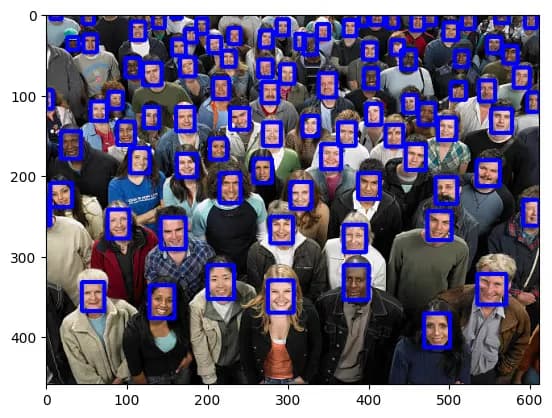
By running the example image and code, you can achieve results like the below.
5. Completing the Code
Instead of drawing a box after finding the face with the code above, perform a blur process, and the automatic mosaic is complete.
The blur process is done by blurring an image with cv2.blur, and then replacing the respective position's image with the blurred image.
Below is the entire code.
from pathlib import Path
import cv2
import numpy as np
from ultralytics import YOLO

def imread(file, flags=cv2.IMREAD_COLOR, dtype=np.uint8):
    try:
        n = np.fromfile(file, dtype)
        img = cv2.imdecode(n, flags)
        return img
    except Exception as e:
        print(e)
        return None

def imwrite(file, img, params=None):
    try:
        suffix = Path(file).suffix
        result, n = cv2.imencode(suffix, img, params)

        if result:
            with open(file, mode='w+b') as f:
                n.tofile(f)
            return True
        else:
            return False
    except Exception as e:
        print(e)
        return False

rootpath = Path.cwd()
model = YOLO(rootpath/'yolov11n-face.pt')
blur_ratio = 100
folders = Path(rootpath/"mosaic")
for folder in folders.iterdir():
    if folder.is_dir():
        backupFolder = folder / "backup"
        backupFolder.mkdir(exist_ok=True)
        for imgPath in folder.iterdir():
            if imgPath.suffix == ".png" or imgPath.suffix ==".jpg" or imgPath.suffix ==".JPG" or imgPath.suffix ==".jpeg" or imgPath.suffix ==".PNG":
                img = imread(str(imgPath))
                backupImgPath = backupFolder / f"{imgPath.stem}.webp"
                imwrite(str(backupImgPath), img, [cv2.IMWRITE_WEBP_QUALITY, 90])
                results = model.predict(img, show=False)
                boxes = results[0].boxes.xyxy.cpu().tolist()

                for box in boxes:
                    obj = img[int(box[1]):int(box[3]), int(box[0]):int(box[2])]
                    blur_obj = cv2.blur(obj, (blur_ratio, blur_ratio))
                    img[int(box[1]):int(box[3]), int(box[0]):int(box[2])] = blur_obj
                # iterate detection results
                newImgPath = imgPath.parent / f"{imgPath.stem}.webp"
                imgPath.unlink()
                imwrite(str(newImgPath), img, [cv2.IMWRITE_WEBP_QUALITY, 90])



댓글을 불러오는 중...