In the previous post, we covered how to work with data using a library called Pandas.
Today, we’re going to solve some practice problems where we do simple outputs with pandas.
1. Data sources
These days, there is a lot of open big data. If you just search for 'big data' on Google, you’ll see many sites.
Among them, I’d like to introduce the Public Data Portal and kaggle.
1) Public Data Portal
The Public Data Portal is a site that provides various data owned by the government so that citizens can use it.
It provides a variety of information such as sea water temperature, weather, subway usage, population density, and more.
The biggest advantage of this site is that it is specialized for data about Korea.
2) kaggle
kaggle is a data analysis and data science community where you can get a lot of big data.
The most famous dataset you can get here is the Titanic dataset.
It contains various data such as the names, addresses, gender, and cabin classes of passengers on the Titanic. When you first learn data visualization, this dataset is often used.
3) The data we’ll use today is...
The data we’ll use today is the number of heatwave days by province in Korea, which is publicly available on the Public Data Portal.
You can search for it and download it from the Public Data Portal.
The original data is in csv format, so I converted it to an xlsx file.
Pandas can also handle csv files, but it can throw errors when there is Korean data.
So you need a few more lines of code to read the file.
Since we are still beginners, let’s try to work with data in xlsx format whenever possible.
2. Problems
Now it’s time to solve some problems. Print the data according to questions 1–4 below and then check the answers.
Load the hot_wave.xlsx file into a variable named hot and print only the top 3 rows.
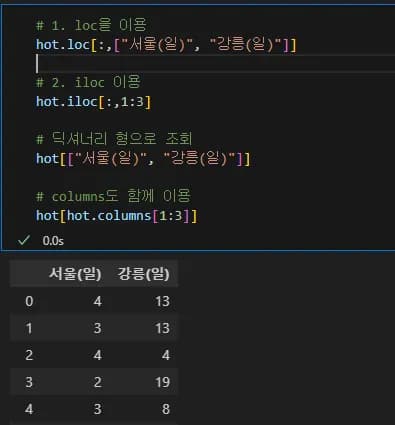
From the hot_wave.xlsx data, print only the number of heatwave days for Seoul and Gangneung.
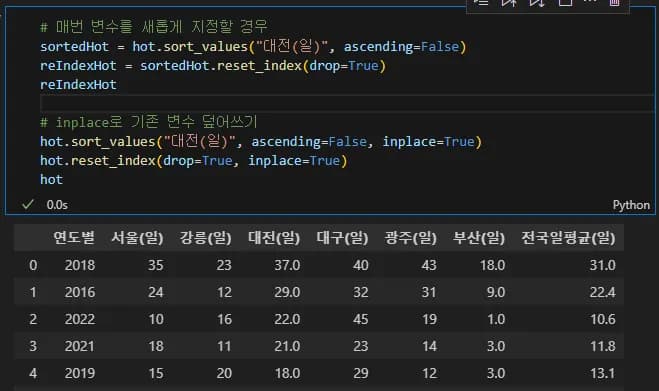
Sort the hot_wave.xlsx data in descending order based on the number of heatwave days in Daejeon, then discard the existing index and reset the index.
From the hot_wave.xlsx data, print only the data where the heatwave measurement year is after 2015.

3. Answers
Since the difficulty is low, I won’t add separate explanations for the answers.
If you’re not sure, refer to the previous post. And if you happen to click on an ad by mistake, that’s even better.
1) Answer to Problem 1
import pandas as pd
hot = pd.read_excel("./hot_wave.xlsx")
hot.head(3)
2) Answer to Problem 2
# 1. Using loc
hot.loc[:,["서울(일)", "강릉(일)"]]
# 2. Using iloc
hot.iloc[:,1:3]

# Query in dictionary form
hot[["서울(일)", "강릉(일)"]]

# Use together with columns
hot[hot.columns[1:3]]
3) Answer to Problem 3
# If you assign a new variable each time
sortedHot = hot.sort_values("대전(일)", ascending=False)
reIndexHot = sortedHot.reset_index(drop=True)
reIndexHot

# Overwrite the existing variable with inplace
hot.sort_values("대전(일)", ascending=False, inplace=True)
hot.reset_index(drop=True, inplace=True)
hot
4) Answer to Problem 4
hot.loc[hot["연도별"] > 2015]

hot[hot["연도별"] > 2015]

hot[hot.연도별 > 2015]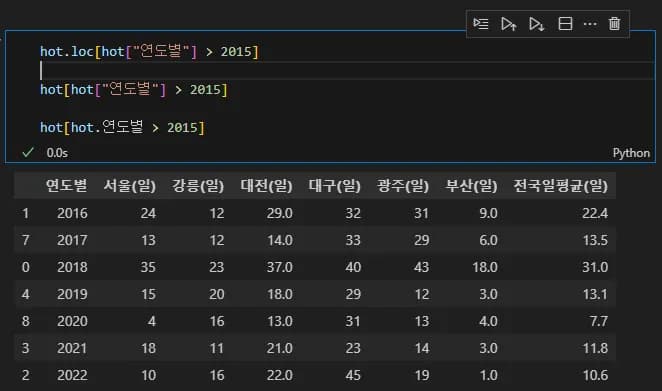
4. In closing
In the next post, we’ll look at the basic usage of Matplotlib.
After you learn Matplotlib’s features to some extent, we’ll then practice visualizing data loaded with pandas using Matplotlib.





댓글을 불러오는 중...