I kept encountering errors trying to use pyperclip on Ubuntu.
After multiple attempts at crawling, nothing worked, leading to unnecessary dependency installations.
By chance, I found the solution on the official website.
Below is the pip guide for pyperclip.
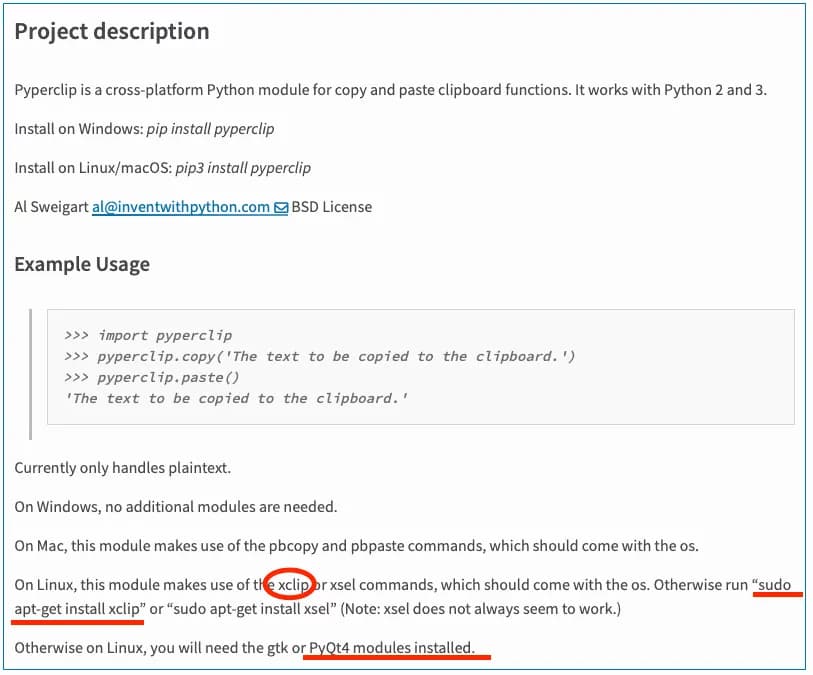
After reading the content, it says to install one of xclip, xsel, or PyQt4.
PyQt4 didn't work, but installing xclip allowed the program to run smoothly.
So, copy and paste the code below.
For reference, use pip3 to install pyperclip, as shown in the image above.
sudo apt-get install xclipIf there are any incorrectly installed modules, you can remove them cleanly with the remove, purge, and autoremove commands.
# To remove a module: apt-get remove
sudo apt-get remove "module name"

# To remove a module and its configuration: apt-get purge
sudo apt-get purge "module name"

 # Remove unused dependencies sudo apt-get autoremove
Ubuntu can be difficult to handle, but it's fun to solve issues one by one like this. That's it.





댓글을 불러오는 중...