1. 2025 September Earth Science I, Question 20
While solving a mock exam for Earth Science this September, there was one question that really broke my brain.
It was Question 20, an exoplanetary system exploration question, but no matter how I looked at it, I couldn’t find the period.
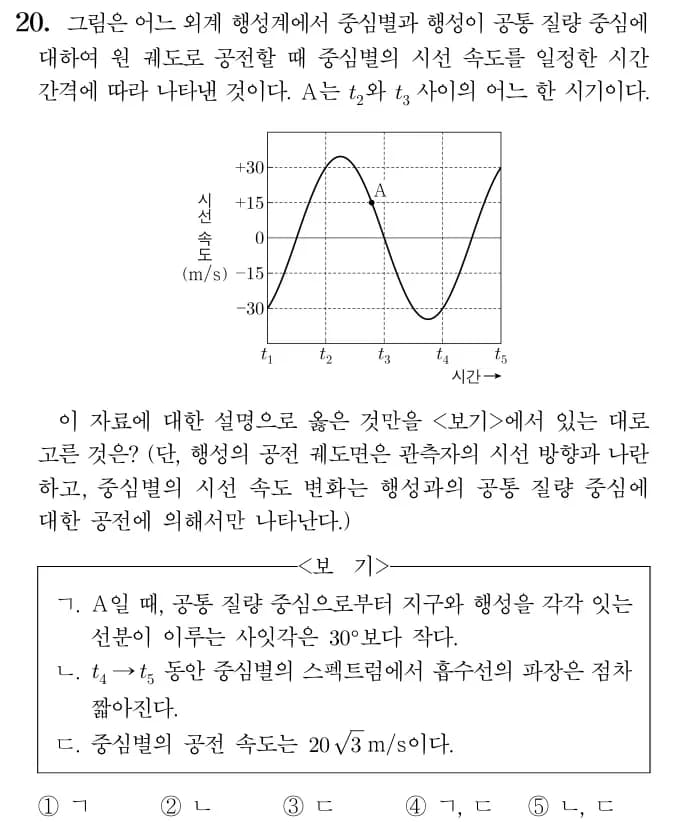
In the end, I couldn’t solve it and had to go through the humiliation of watching an EBS lecture.
The key was the period of the graph.
Since the period on the graph runs from t1 to t4, at points where the radial velocity is -30 to +30 m/s, the system has rotated through 1/3 of the full period.
Therefore, between t1 and t2, the rotation angle is 120°, so at the point where the radial velocity is +30, the angle between the line of sight–center of revolution–central star is 60°.
Even as I was explaining it, I felt like “What on earth is this?”, so I tried to visualize it with a diagram.
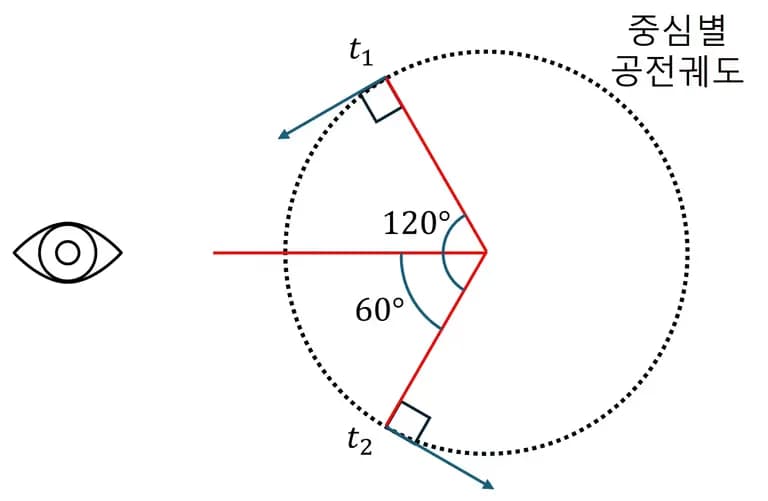
Then, if we calculate the radial velocity at point t2, we get the following.
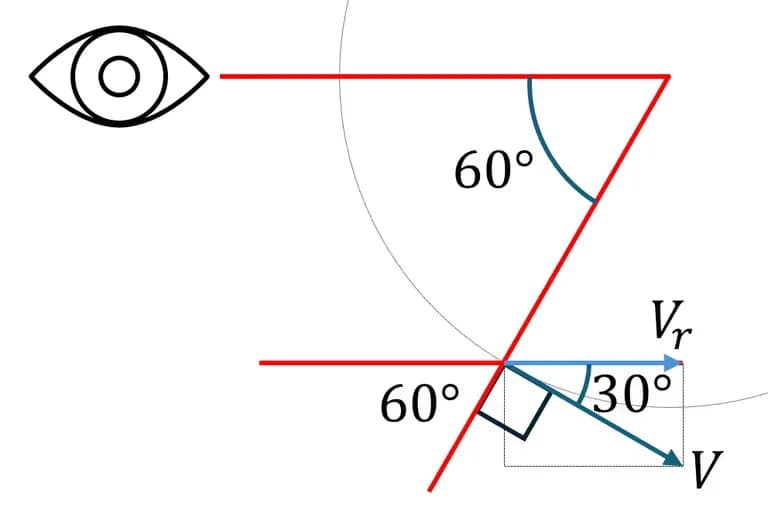
Here, Vr = V * cos30º, and since Vr = 30 m/s, V = Vr / cos30º.
So the shocking conclusion is that option ③ is correct.

How are you supposed to solve this in just one minute...
I don’t think even Gauss reincarnated could solve this in under a minute.
Anyway, I decided to explain the entire solution method for this problem to the 11th graders and then give them the exact same question as a performance assessment.
Of course, while I was explaining it, I did not tell them that this question would appear on their performance assessment.
2. Giving the performance assessment
All the Earth Science I classes are on Monday, so we decided to give the test on Monday.
But then...?

When I walked into the classroom, half of the students were gone.
Rumor had spread that the question was difficult, and the students who hadn’t prepared for the performance assessment had called in sick and gone home early.
There were kids who were genuinely sick, but I couldn’t just give the exact same test again like this.
The students who had taken the test honestly argued that if we used the existing question as‑is, it would be unfair in terms of equity in evaluation.
So I ended up drawing the graph with Python.
3. Making the performance assessment with Python
I decided to keep the same question type but change the values and the period itself.
And to keep tweaking the values and checking them easily, I worked in a Jupyter environment.
First, I call the modules and set the font so that Korean characters don’t get garbled.
from matplotlib import pyplot as plt
import matplotlib
import numpy as np
from numpy import pi
matplotlib.rcParams["font.family"] = "batang"

matplotlib.rcParams["font.size"] = 13
plt.rcParams['axes.unicode_minus'] = False
Then I set the range of x values for the graph and the maximum speed.
xStart = -pi
xEnd = 3*pi
maxV = 20*(3**0.5)

x = np.arange(xStart, xEnd, 0.1)
y = np.sin(x)*maxV
You can conveniently use the value of pi by calling pi from numpy.
Then, after appropriately setting the figure size and running the code, you get a graph like the one below.
plt.figure(figsize=(7,3))
plt.plot(x,y, color="black")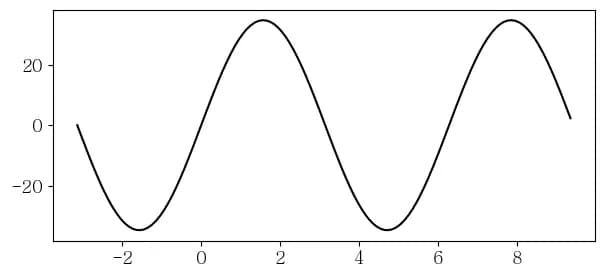
It’s still missing quite a lot.
Now let’s crop the necessary part of this graph and configure each axis.
We change the axis values with xticks and yticks, and crop the graph appropriately with xlim and ylim.
Then, if we draw a grid, we get a fairly decent‑looking graph.
plt.xticks(np.arange(xStart, xEnd, 2*pi/3),[f"t{x}" for x in range(6)])
plt.yticks([-45,  -30, -15, 0, 15, 30, 45])
plt.xlim(xStart+2*pi/3, xEnd-pi*2/3)
plt.ylim(-45,45)
plt.grid(linestyle='--')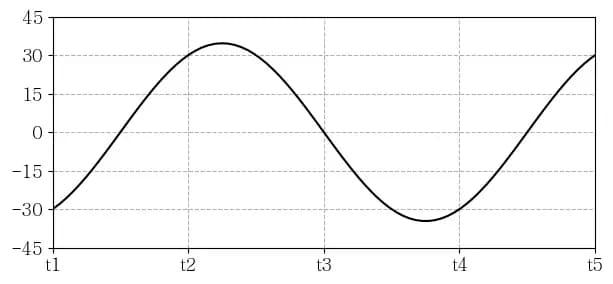
Finally, I use scatter to mark the point I want and set the axis labels.
z = np.arcsin(-(3**0.5)/2)
plt.scatter(z+2*pi,np.sin(z)*maxV, color="black")
plt.xlabel("Time →", loc="right")
plt.ylabel("Radial velocity (m/s)")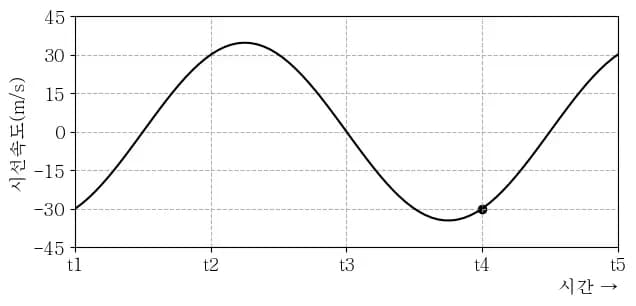
Now, by changing the period of the function here, or by changing the maximum and minimum values, you can generate variations of the problem.
4. Application
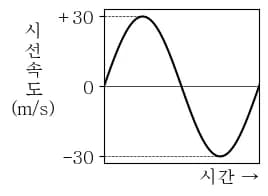
For the second written exam this time, I wanted to take the question below and flip the radial velocity values of the graph on the right, and change the maximum value to 30.
So I wrote code using the method above.
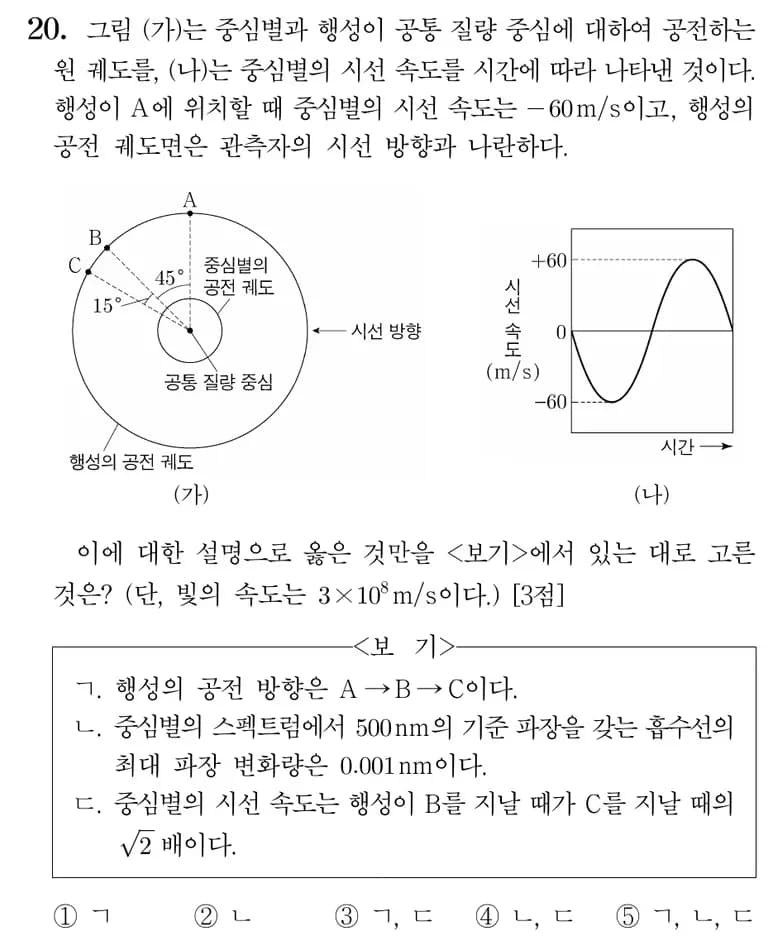
from matplotlib import pyplot as plt
import matplotlib
import numpy as np
from numpy import pi
# matplotlib.rcParams["font.family"] = "AppleGothic"
matplotlib.rcParams["font.family"] = "batang"

matplotlib.rcParams["font.size"] = 13
plt.rcParams['axes.unicode_minus'] = False
xStart = 0
xEnd = 4*pi
maxV = 30

x = np.arange(xStart, xEnd, 0.1)
y = np.sin(x)*30
plt.figure(figsize=(2,2))
plt.plot(x,y, color="black")
plt.xticks([])
plt.yticks([-30, 0, 30], ["-30", 0 ,"+30"])
# plt.grid(linestyle="--")
plt.xlim([0, 2*pi])
plt.xlabel("Time →", loc="right")
plt.plot([0, pi/2],[30, 30], color="black", linestyle="--",linewidth=0.5)
plt.plot([0, pi*3/2],[-30, -30], color="black", linestyle="--",linewidth=0.5)
plt.plot([0, pi*3],[0, 0], color="black", linewidth=0.5)
ylabel = plt.ylabel("R\na\nd\ni\na\nl\n v\ne\nl\no\nc\ni\nt\ny\n(m/s)", rotation=0, labelpad=18)
ylabel.set_position((0,0.3))
At first, I wondered briefly how I should draw the dashed lines in the middle, but it turned out it was just a matter of drawing straight lines.
I was quite satisfied with the final result.
5. Epilogue
It was a time when I could improve the quality of the exam questions and study coding at the same time.
I plan to apply this a lot more in the future.





댓글을 불러오는 중...