지난 글에서는 Matplotlib 에서 subplots를 이용해 그래프를 그려보았다.
이번 글에서는 numpy의 polynomial을 이용해 선형회귀 분석을 해보려고 한다.
1. 선형 회귀 분석이란?
위키백를 보면 선형회귀분석을 아래와 같이 설명한다.
통계학에서 선형 회귀는 종속 변수 y와 한 개 이상의 독립 변수 X와의 선형 상관 관계를 모델링하는 회귀분석 기법이다.
-위키백과-
정말 간단하게 이야기하면, 그래프에 표시되는 값들이 가지는 평균적인 기울기라고도 할 수 있다.
선형회귀를 그래프에 표시하면 눈으로 막연히 보이는 두 값의 상관 관계를 더욱 확실하게 보여줄 수 있다.
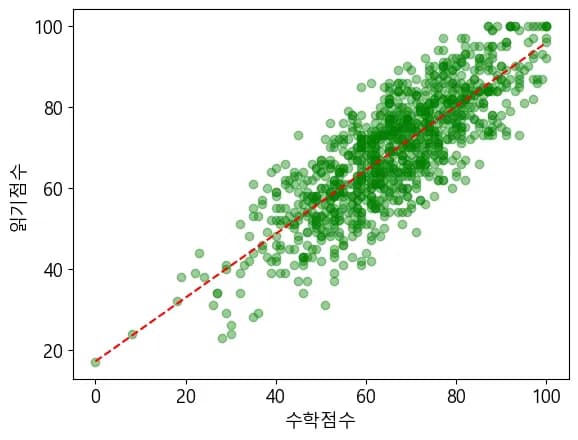
위의 그래프는 kaggle에서 다운받은 자료를 시각화 한 것이다.
학부모의 학력, 인종, 학생의 성취도가 담겨있는데 그 중에서 수학-읽기 점수의 관계를 도식화 해보았다.
파일은 아래 첨부한 것을 다운 받거나, 링크로 들어가서 받아도 괜찮다. 아래 파일은 한글화를 시켜 두었으니, 편한것을 선택하길 바란다.
데이터의 원본 출처는 아래에 남긴다.
2. 그래프 그리기
먼저 위의 그래프처럼 학생들의 수학, 읽기 점수를 scatter 로 그래프를 그려보자.
이전 강의에서 봤던 코드에서 똑같이 시작하고, 불러오는 파일의 경로만 변경하면 된다.
import pandas as pd

# 모듈 호출 및 한글폰트 설정
import matplotlib.pyplot as plt
import matplotlib

# MacOS에서 폰트설정
# matplotlib.rcParams["font.family"] = "AppleGothic"

# 윈도우에서 폰트설정
matplotlib.rcParams["font.family"] = "Malgun Gothic"

# 폰트 크기 설정
matplotlib.rcParams["font.size"] = 13

# 마이너스 출력 문제 해결
plt.rcParams['axes.unicode_minus'] = False

score = pd.read_excel("./StudentsPerformance.xlsx")
score.head(3)
이제 이것을 이용해 수학 점수, 읽기 점수를 plt.scatter의 파라미터로 넣어준다.
plt.scatter(score["수학점수"], score["읽기점수"])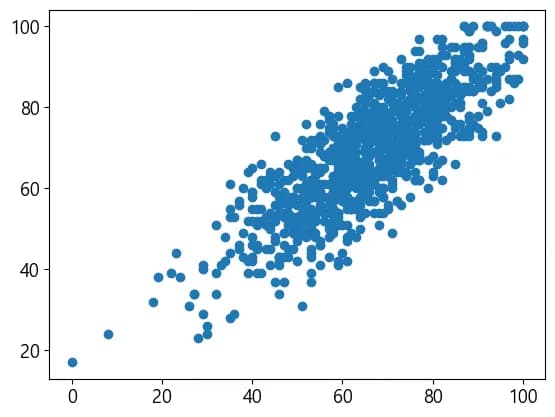
그래프가 이쁘지 않으니 조금 더 꾸며보았다.
그래프의 색, 투명도, 각 축의 레이블을 넣어 주었다.
plt.scatter(score["수학점수"], score["읽기점수"], alpha=0.4, color="green")
plt.xlabel("수학점수")
plt.ylabel("읽기점수")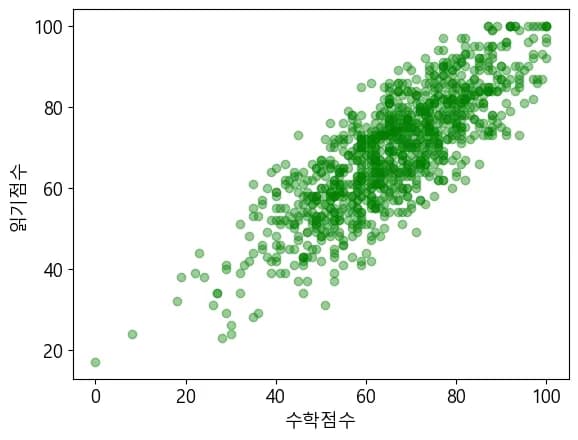
기본적인 그래프가 완성되었으니 이제 numpy를 활용하여 선형회귀분석을 해보자.
3. Polynomial
numpy의 polymomial을 호출한 뒤 분석하고자 하는 x값, y값, 몇차함수 인지를 파라미터로 입력하면 된다.
우리는 수학점수, 읽기점수를 1차 함수로 선형휘귀 분석을 해보자.
from numpy.polynomial import Polynomial

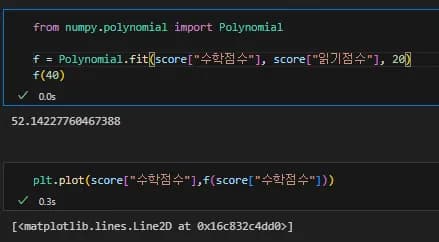
f = Polynomial.fit(score["수학점수"], score["읽기점수"], 1)
이렇게 입력하면 polynomial은 예측한 선형함수를 반환한다.
따라서 f는 x값을 파라미터로 받는 함수가 된다.
아래와 같이 입력해서 예측값을 한번 보자.
from numpy.polynomial import Polynomial

f = Polynomial.fit(score["수학점수"], score["읽기점수"], 1)
f(40)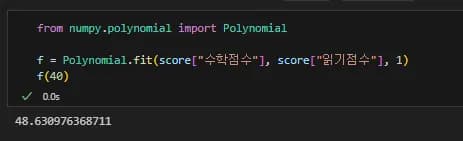
수학점수가 40점인 학생의 읽기점수 예측값은 40이 된다.
이제 그래프를 그려보자.
4. 선형회귀 그래프
자료에서 학생들의 수학점수와 읽기 점수는 0부터 100까지 정렬된 값이 아니다.
그래서 f에 파라미터로 수학점수를 넣어주면 차수가 높아질 수록 그래프가 뒤죽박죽이 된다.
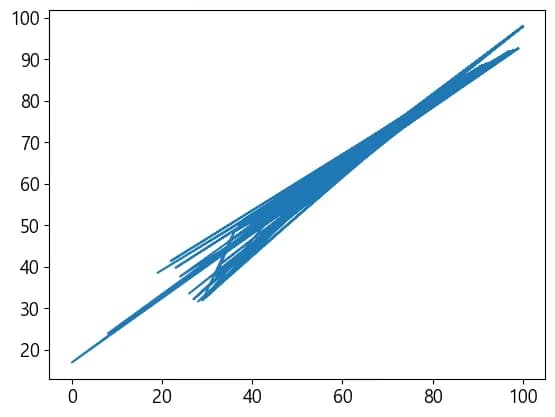
먼저 0부터 100까지의 숫자를 생성 한 뒤 이것을 선형함수의 x값으로 줘서 그래프를 그려야 한다.
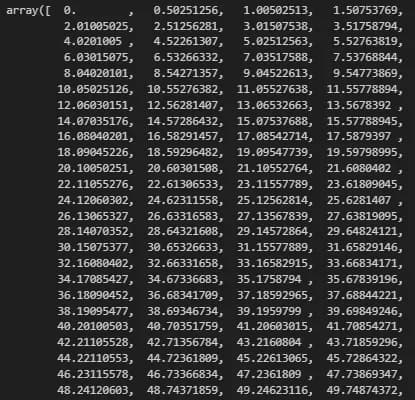
numpy의 linspace는 시작점, 끝점, 안에 채울 숫자의 수를 파라미터로 받아 값을 생성해다.
import numpy as np

x = np.linspace(0,100,200)
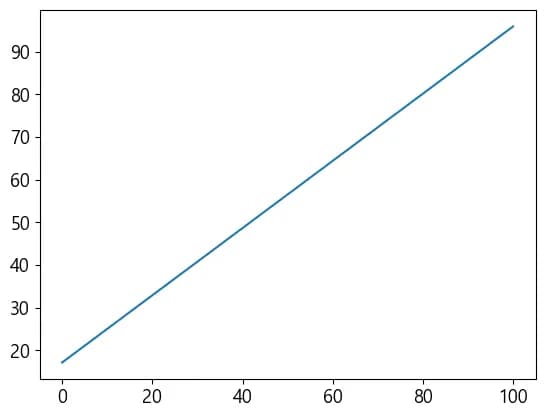
plt.plot(x,f(x))
x의 값을 확인해보면 왼쪽과 같이 생성된 것을 볼 수 있다.
그리고 이것으로 그래프를 그리면 아래와 같이 된다.
5. 그래프 완성하기
이제 그래프 두 개를 겹쳐주기만 하면 끝이다.
plt.scatter(score["수학점수"], score["읽기점수"], alpha=0.4, color="green")
plt.xlabel("수학점수")
plt.ylabel("읽기점수")
plt.plot(x, f(x),"r--")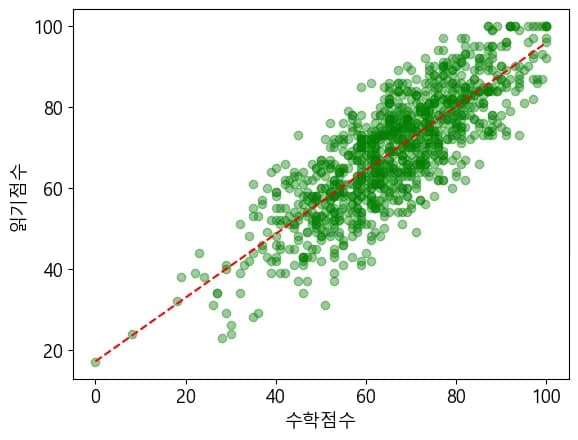
6. 글을 마치며
이번 글에서는 선형회귀분석을 통해 두 값이 어떤 관계를 가지는지 그래프로 그려보았다.
다음 글에서는 데이터 시각화를 이용해 고등학교 생기부를 어떻게 채워나갈지를 고민해보려고 한다.




댓글을 불러오는 중...