이번에는 데이터 시각화 연습문제이다.
기존 자료를 쓰면 또 재미없지 않은가?
새로운 데이터를 이용해보자.
1. 파일 및 문제
파일은 공공데이터 포털에서 받은 연간 범죄 발생 건수, 검거 건수 통계이다.
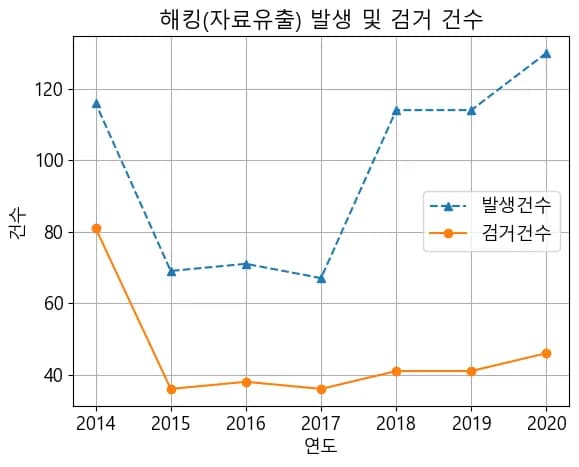
아래의 조건에 따라 그래프를 그려보자.
해킹(자료유출)의 발생 및 검거 건수를 시각화 할 것
제목, x 축 레이블, y 축 레이블, 범례를 설정 할 것
선의 스타일을 바꾸되 자유롭게 변경할 것
기타 스타일은 자유
2. 문제 해답
먼저 지난 글에서 제일 처음 내용을 복붙한다. 여기서 바꿀 것은 파일의 경로 뿐이다.
import pandas as pd

# 모듈 호출 및 한글폰트 설정
import matplotlib.pyplot as plt
import matplotlib

# MacOS에서 폰트설정
# matplotlib.rcParams["font.family"] = "AppleGothic"

# 윈도우에서 폰트설정
matplotlib.rcParams["font.family"] = "Malgun Gothic"

# 폰트 크기 설정
matplotlib.rcParams["font.size"] = 13

# 마이너스 출력 문제 해결
plt.rcParams['axes.unicode_minus'] = False

crime = pd.read_excel("./crime_statistics.xlsx")
crime.head(3)
데이터를 확인해 보면, 연도가 구분에 따라서 2개씩 중복되는 것을 볼 수 있다.
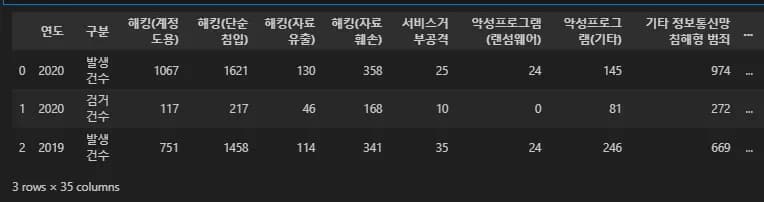
중복되는 연도는 unique()를 통해 제거해준다.
그리고 loc과 조건문을 이용해 해킹의 발생건수, 검거 건수를 추출해서 일단 그래프를 그려본다.
x = crime.loc[:,"연도"].unique()
y1 = crime.loc[crime.구분=="발생건수","해킹(자료유출)"]
y2 = crime.loc[crime.구분=="검거건수","해킹(자료유출)"]
plt.plot(x,y1)
plt.plot(x,y2)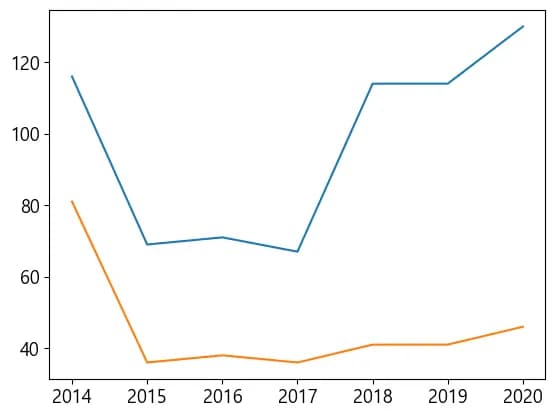
그래프에 범례와 제목을 추가해보자.
x = crime.loc[:,"연도"].unique()
y1 = crime.loc[crime.구분=="발생건수","해킹(자료유출)"]
y2 = crime.loc[crime.구분=="검거건수","해킹(자료유출)"]
plt.plot(x,y1,label="발생건수") # <-- 추가
plt.plot(x,y2,label="검거건수") # <-- 추가
plt.legend() # <-- 추가
plt.title("해킹(자료유출) 발생 및 검거 건수") # <-- 추가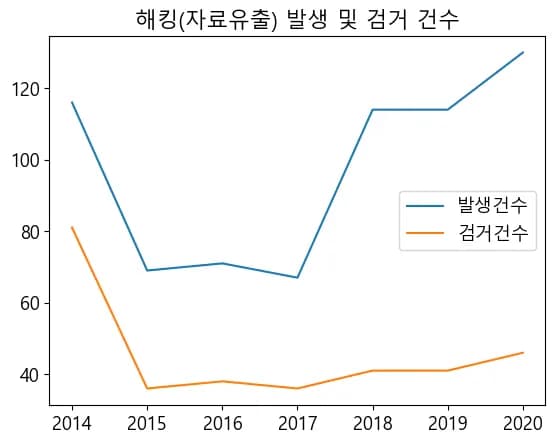
그리고 축 이름도 설정해준다.
x = crime.loc[:,"연도"].unique()
y1 = crime.loc[crime.구분=="발생건수","해킹(자료유출)"]
y2 = crime.loc[crime.구분=="검거건수","해킹(자료유출)"]
plt.plot(x,y1,label="발생건수")
plt.plot(x,y2,label="검거건수")
plt.legend()
plt.xlabel("연도") # <-- 추가
plt.ylabel("건수") # <-- 추가
plt.title("해킹(자료유출) 발생 및 검거 건수")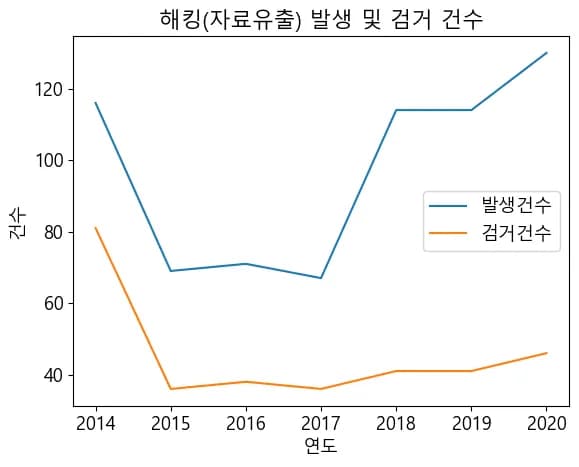
마지막으로 선 스타일을 지정하고 그리드를 추가해 주었다.
x = crime.loc[:,"연도"].unique()
y1 = crime.loc[crime.구분=="발생건수","해킹(자료유출)"]
y2 = crime.loc[crime.구분=="검거건수","해킹(자료유출)"]
plt.plot(x,y1,"^--",label="발생건수") # <-- 추가
plt.plot(x,y2,"o-",label="검거건수") # <-- 추가
plt.legend()
plt.xlabel("연도")
plt.ylabel("건수")
plt.title("해킹(자료유출) 발생 및 검거 건수")
plt.grid() # <-- 추가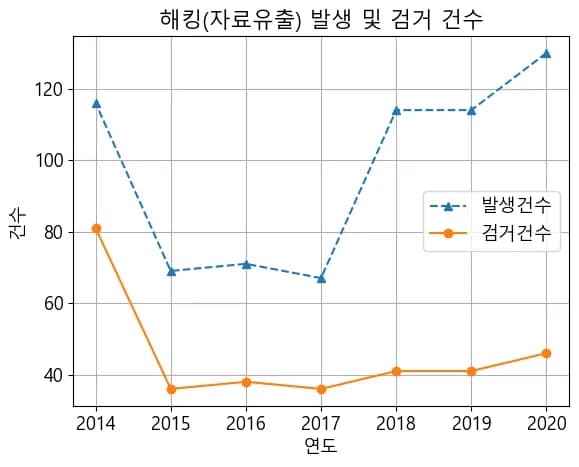
3. 글을 마치며
다음 글에서는 Matplotlib에서 여러개의 그래프를 한꺼번에 그리는 방법에 대해 다루어 보려고 한다.
아무쪼록 데이터 시각화를 연습하는데 많은 도움이 되었으면 하는 바램이다.





댓글을 불러오는 중...