최근 K-업무포털이 공문서 제목을 3개월 단위로 끊어서 보여주는 것을 보며 이런 생각을 해보았다.
만약 크롤링으로 공문 제목을 모두 모아서 3개년 치를 엑셀로 만들어 둔다면?
filter를 이용해 쉽게 공문서 번호를 검색할 수 있을 것 같았다.
결론부터 말하자면 불가능했다.

1. 누구나 계획은 있다.
나의 원대한 계획은 이랬다.
1. python의 selenium으로 업무포털에 접속하고 로그인한다.
2. xpath를 이용해 table 태그 내부의 tr과 td를 수집하고 데이터 프레임으로 만든다.
3. datetime과 delta를 이용해 날짜를 연산하여 3개월 단위로 끊어서 공문을 모두 수집한다.
4. 엑셀, 혹은 구글 스프레드 시트에 넣고 적절하게 이용한다.
하지만 막상 들어가본 업무포털에서는 table는 커녕 iframe도 찾지 못했다.
4시간 동안 삽질하며 크롤링이 불가능한 이유를 한번 적어본다.
2. 너의 보안은?
1. WebDRM
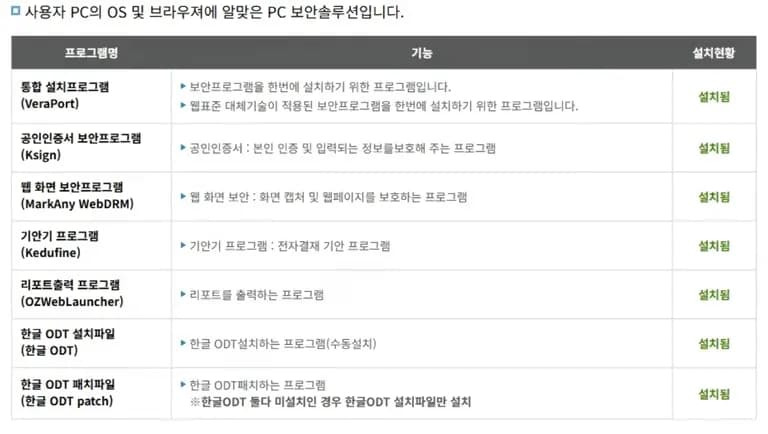
첫번째 장벽은 WebDRM이었다.
이것 때문에 개발자 모드를 켤수도 없었던 것.
하지만 개발자 모드가 기존에 켜져 있으면 해당 사이트에 접속해도 유지된다는 점을 이용해 보았다.
결국 개발자 모드를 켜는데 까지는 성공했다.
2. 브라우저에는 보이는데 요소가 없다고?
이 부분이 가장 이해하기 힘들었다.
분명히 개발자 모드에서는 요소들이 빤히 보이는데, 크롬드라이버에서 page_source를 하면 요소들이 하나도 나오지 않았다.
그건 selenium을 쓰던, puppeteer를 쓰던 마찬가지였다.
더 신기한건, 콘솔 내에서의 자바 스크립트를 써도 보이지 않는다는 것이다.
보이는데 찾지 못하는, 그런 될듯 말듯함이 나를 더 미치게 만들었다.
const puppeteer = require('puppeteer');
const fs = require('fs');
// puppeteer를 사용하여 웹 페이지의 HTML을 가져오는 스크립트

(async () => {
  let browser;
  try {
    browser = await puppeteer.launch({
      headless: false,
      args: ['--no-sandbox', '--disable-setuid-sandbox'],
      defaultViewport: null,
      userDataDir: './user_data',
    });

    const page = await browser.newPage();

    await page.goto('https://klef.goe.go.kr/keris_ui/main.do', {
      waitUntil: 'networkidle0', // 모든 리소스 로딩 대기
      timeout: 60000, // 최대 60초 대기
    });

    const html = await page.content();
    fs.writeFileSync('schoolDoc.html', html, 'utf8');
    console.log('HTML 파일이 schoolDoc.html로 저장되었습니다.');

  } catch (error) {
    console.error('오류 발생:', error);
  } finally {
    if (browser) await browser.close();
  }
})();
이렇게 해서 저장한 파일을 다시 열어보면 아래와 같은 모습이 보였다.
내가 원하는 테이블은 나오지 않고, 로그인 모듈이 뜨는 것.
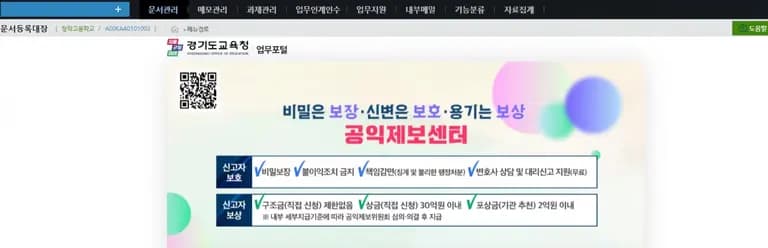
왜 그럴까 생각하다 보니 공문을 보여주는 테이블 자체가 다른 설치형 프로그램이 아니었나 싶었다.
그렇게 생각하니 조금 더 쉽게 포기할 수 있게 되었다.
3. 업무포털은 웹소켓을 쓴다.
먼저 업무포털은 일반적인 REST API 통해 데이터를 전송하는게 아니라 websocket을 이용해 사용자와 데이터를 주고받는다.
이 점이 무척 흥미로웠다.
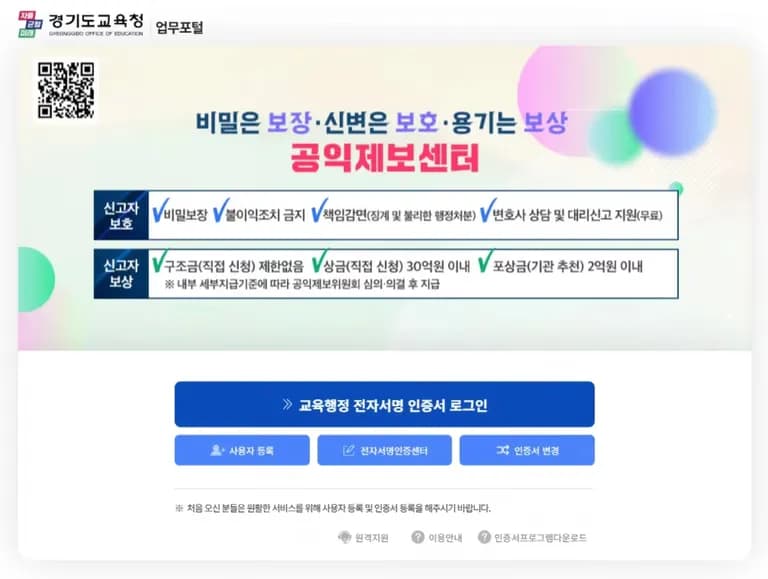
그래서 requests와 같은 다른 라이브러리로 쿠키를 복사해 새로운 연결을 시도하려고 해도 웹소켓의 핸드쉐이크 과정과 세션 유지방식 때문에 불가능했다.
하지만 여기서 좌절할 수 없었다.
selenium-wire를 이용해 웹소켓을 통해 이루어지는 요청과 응답을 한번 들춰보기로 했다.
# 요청들 순회
for request in driver.requests:
    if request.response:
        content_type = request.response.headers.get('Content-Type', '')
        if content_type.startswith('application/json'):
            print("== 요청 URL:", request.url)
            try:
                body = request.response.body.decode('utf-8', errors='ignore')
                print("== 응답 내용:", body)
            except Exception as e:
                print("== 디코딩 오류:", e)

driver.quit()
그랬더니 base64로 인코딩 된듯한 알파벳들이 나왔다.
이걸 그래서 다시 디코딩 했는데 규격에 맞지 않아 실패.
여기서 나는 그만 들어가기로 마음먹었다.
3. 느낀점
공공기관의 사이트들의 속도가 느린 것이 불만이었는데, 이번에 파보니 그래도 보안 만큼은 잘 되어 있는 것 같다는 생각이 들었다.
원격으로 데이터 하나 얻기도 쉽지 않았고, 덕분에 많이 배웠다.
하지만 다음에 또 시도해볼 것 같다.




댓글을 불러오는 중...