最近我觉得博客需要多语言功能。
于是决定用 next-intl 来实现多语言服务。
1.i18n
首先,在做多语言服务时有一些必须遵守的原则。
这被称为 internationalization,单词太长,所以把首字母 i 和尾字母 n,以及中间 18 个字母合在一起,写成 i18n。
1) i18n 的原则
(1) 禁止字符串硬编码
不要在代码里直接写入像「회원가입」这样的字符串,而是始终通过消息键来获取。
比如我们要做一个博客首页。
可以像下面这样写。
// components/Header.tsx
export function Header() {
  return (
    <header>
      <h1>지구과학 블로그</h1>
      <button>로그인</button>
      <button>회원가입</button>
    </header>
  );
}
如果硬编码的话,就必须为每种语言单独创建一个组件。
与其这样,不如按照语言、地区拆分资源,这样就可以集中修改。
比如韩文是 ko.ts,英文是 en.ts,分别准备独立的资源文件。
当然,使用 json 也完全没问题。
// locales/ko.ts
export const ko = {
  header: {
    title: '지구과학 블로그',
    login: '로그인',
    signup: '회원가입',
  },
};

// locales/en.ts
export const en = {
  header: {
    title: 'Earth Science Blog',
    login: 'Log in',
    signup: 'Sign up',
  },
};
根据 locale 调用对应内容,就可以实现切换语言。
(2) 使用参数与支持复数形式
像 "안녕하세요 힘캥님" 这样的内容,要以 `안녕하세요, ${name}님` 的形式管理,只让名字部分发生变化。
另外,英语中 1 comment、2 comments 有单复数区分,这种内容需要在消息层面做好处理。
// locales/ko.ts
export const ko = {
  greeting: '안녕하세요, {name}님',
  comments: {
    zero: '아직 댓글이 없습니다.',
    one: '댓글이 1개 있습니다.',
    other: '댓글이 {count}개 있습니다.',
  },
};

// locales/en.ts
export const en = {
  greeting: 'Hello, {name}',
  comments: {
    zero: 'No comments yet.',
    one: 'There is 1 comment.',
    other: 'There are {count} comments.',
  },
};
(3) 按 locale 处理日期 / 数字 / 货币格式
不同国家在表示日期和数字方面差异很大。
比如 2025 年 11 月 27 日,可以写成 2025-11-27,也可以写成 27/11/2025。
(4) locale negotiation 与默认值(fallback)
先查看浏览器语言、URL、Cookie 等,如果没有支持的语言,则设置为 defaultLocale。
(5) 翻译与代码的分离
开发者不负责翻译文本,只使用键。
译者通过 JSON 或单独的工具来管理文本。
2. next-intl
在众多库中,next-intl 在满足以上 i18n 条件 的同时,也有大量用户在使用。
所以我也决定在自己的博客上试着使用它。
先安装库。
yarn add next-intl然后在根目录下创建 i18n/config.ts 文件。
// i18n/config.ts
export const defaultLocale = 'ko';
export const locales = ['ko', 'en', 'ja'] as const;
export type Locale = (typeof locales)[number];
接着在 i18n/request.ts 中创建一个用于在服务器组件中获取消息的函数。
// i18n/request.ts
import { getRequestConfig } from 'next-intl/server';
import { defaultLocale } from './config';

export default getRequestConfig(async ({ requestLocale }: { requestLocale: Promise<string | undefined> }) => {
  const locale = await requestLocale || defaultLocale;
  return {
    locale,
    messages: (await import(`./message/${locale}.json`)).default,
  };
});
然后创建一个 message 文件夹,为每个语言编写一个 json 文件。
如果缺少某个语言对应的 json 文件,访问时就会报错。
/messages
  ├── ko.json
  ├── en.json
  └── ja.json
这些文件必须具有相同的内部结构。
如果你想折磨开发者,就故意做成不同结构吧。
// ko.json
{
  "Home": {
    "title": "지구과학 블로그",
    "readMore": "더보기"
  }
}

// en.json
{
  "Home": {
    "title": "Earth Science Blog",
    "readMore": "Read more"
  }
}
接下来轮到创建 [locale] 文件夹。
在 App Router 中,把 locale 放在顶层路径是比较自然的做法。
不需要 locale 的路径或 api 可以排除在外。
app
 ├── [locale]
 │     ├── layout.tsx
 │     ├── page.tsx
 │     └── ... (其他路由)
 └── layout.tsx
在主 layout.tsx 中按需要进行配置即可。
在 [locale]/layout.tsx 中如下设置,以便能够使用 locale。
// app/[locale]/layout.tsx
import { NextIntlClientProvider, getMessages } from 'next-intl';
import { locales } from '@/i18n/config';
import { notFound } from 'next/navigation';

export default async function LocaleLayout({ children, params }) {
  const { locale } = params;

  if (!locales.includes(locale)) {
    notFound(); // 404 处理
  }

  const messages = await getMessages();

  return (
    <html lang={locale}>
      <body>
        <NextIntlClientProvider messages={messages} locale={locale}>
          {children}
        </NextIntlClientProvider>
      </body>
    </html>
  );
}
这里的 getMessages() 函数会根据 locale 获取消息,然后通过 Provider 分发。
这样在子组件中就可以根据 locale 使用对应的消息。
来看一个使用示例。
// 服务器组件
import { getTranslations } from 'next-intl/server';

export default async function Page() {
  const t = await getTranslations('Home');

  return <h1>{t('title')}</h1>;
}

// 客户端组件
'use client';

import { useTranslations } from 'next-intl';

export default function ReadMoreButton() {
  const t = useTranslations('Home');

  return <button>{t('readMore')}</button>;
}
在服务器组件中用 getTranslation,在客户端组件中用 useTranslation。
在 metadata 中也可以用同样方式根据 locale 设置不同的值。
// app/[locale]/posts/[slug]/page.tsx
import { getTranslations } from 'next-intl/server';

export async function generateMetadata({ params }) {
  const t = await getTranslations({ locale: params.locale, namespace: 'Post' });

  return {
    title: t('metaTitle'),
    description: t('metaDescription')
  };
}
2. 修改 db schema
到目前为止难度都不算高。
直到我意识到必须修改 db 为止。
我之前使用的 db schema 如下。
model Post {
  id               String          @id @default(cuid())
  title            String
  processedContent String?         // 用于渲染的处理后内容
  thumbnail        String?
  createdAt        DateTime        @default(now())
  updatedAt        DateTime?
  likes            Int             @default(0)
  categoryId       String?
  ....
}
如果想让所有 locale 共享 likes、views,就必须把 processedContent 拆出来,再建一张按 locale 区分的表。
如果在 post 本身里塞入所有 locale 的 content,表会变得过于臃肿,也不符合范式。
修改 schema 本身并不难,但一旦把内容从 post 中拆出去,我站点里所有写文章、查询、分页等函数都必须一起改。
所以我决定先逐步改造。
// 保留原有 Post
model Post {
  ....
}

model PostLocale {
  id               String   @id @default(cuid())
  postId           String
  locale           String
  title            String
  excerpt          String
  content          String
  ...

  post Post @relation(fields: [postId], references: [id], onDelete: Cascade)
}
两张表通过 relation 关联之后,就可以用 postId 和 locale 返回不同的文章内容。
为了尽量减少组件层的修改,我把原有的文章查询函数和通过 locale 查询文章的函数的输出类型做成一致。
export async function getLocalizedPostBySlug(
  slug: string,
  locale: string
): Promise<PostContentProps | null> {
  // 查询文章
  const basePost = await getPostBySlug(slug);
  // 根据查询到的文章内容,再查询对应 locale 的记录
  const localeEntry = await prisma.postLocale.findFirst({
    where: {
      postId: basePost.id as string,
      locale,
    },
  });

  const localizedContent = localeEntry.processedContent || localeEntry.content;
  // 返回查询结果
  return {
    ...basePost,
    title: localeEntry.title,
    excerpt: localeEntry.excerpt,
    category: localeEntry.category ?? basePost.category,
    content: localeEntry.content,
  };
}
在文章详情页的查询中也反映了这一逻辑。
export default async function PostPage({
  params,
}: {
  params: Promise<{ slug: string }>;
}) {
  const { slug } = await params;
  const locale = await getLocale();
  const post =
    locale !== "ko"
      ? await getLocalizedPostBySlug(slug, locale)
      : await getPostBySlug(slug);
  ...
}
现在只要把文章翻译好写进 db 就行了。
3. 使用 Vercel AI SDK 进行翻译
用 Python 也能实现,但我想用纯 TypeScript,于是决定使用 Vercel AI SDK。
使用 Generate Text 就可以通过 API 获取生成的内容。
import { PrismaClient } from "@prisma/client";
import { generateText } from "ai";
import { openai } from "@ai-sdk/openai";

const prisma = new PrismaClient();

const TARGET_LOCALES = ["en", "zh", "ja", "es"] as const;

async function translatePost(post: {
  id: string;
  title: string;
  content: string;
}) {
  ...
  // 查询文章
  for (const locale of TARGET_LOCALES) {
    const exists = await prisma.postLocale.findUnique({
      where: {
        postId_locale: {
          postId: post.id,
          locale,
        },
      },
    });
    // 预先指定输出格式
    const payload = JSON.stringify({
      targetLocale: locale,
      title: post.title,
      content: post.content,
    });

    const { text } = await generateText({
      model: openai("gpt-5.1"),
      // prompt 设置
      system:
        "You are a professional translator. Translate the JSON fields `title` and `content` into `targetLocale`. Preserve HTML tags, Markdown, code blocks, links, and inline styles exactly as-is; only translate the human-readable text. Keep technical terms and product names unless a well-known localized form exists. Return the translated JSON with the same keys and no extra commentary.",
      prompt: payload,
    });
    // text 里会有 ''' 之类的字符,实际使用时需要转义。
    const json = JSON.parse(text);

    await prisma.postLocale.create({
      data: {
        postId: post.id,
        locale,
        title: json.title || post.title,
        content: json.content || post.content,
        category: json.category || null,
        // 省略其他字段
      },
    });
    results[locale] = json;
  }
  return results;
}
像这样把大约 170 篇文章翻译成 4 种语言,大概花了一个多小时。
总共花费的 API 费用是 16.69 美元。
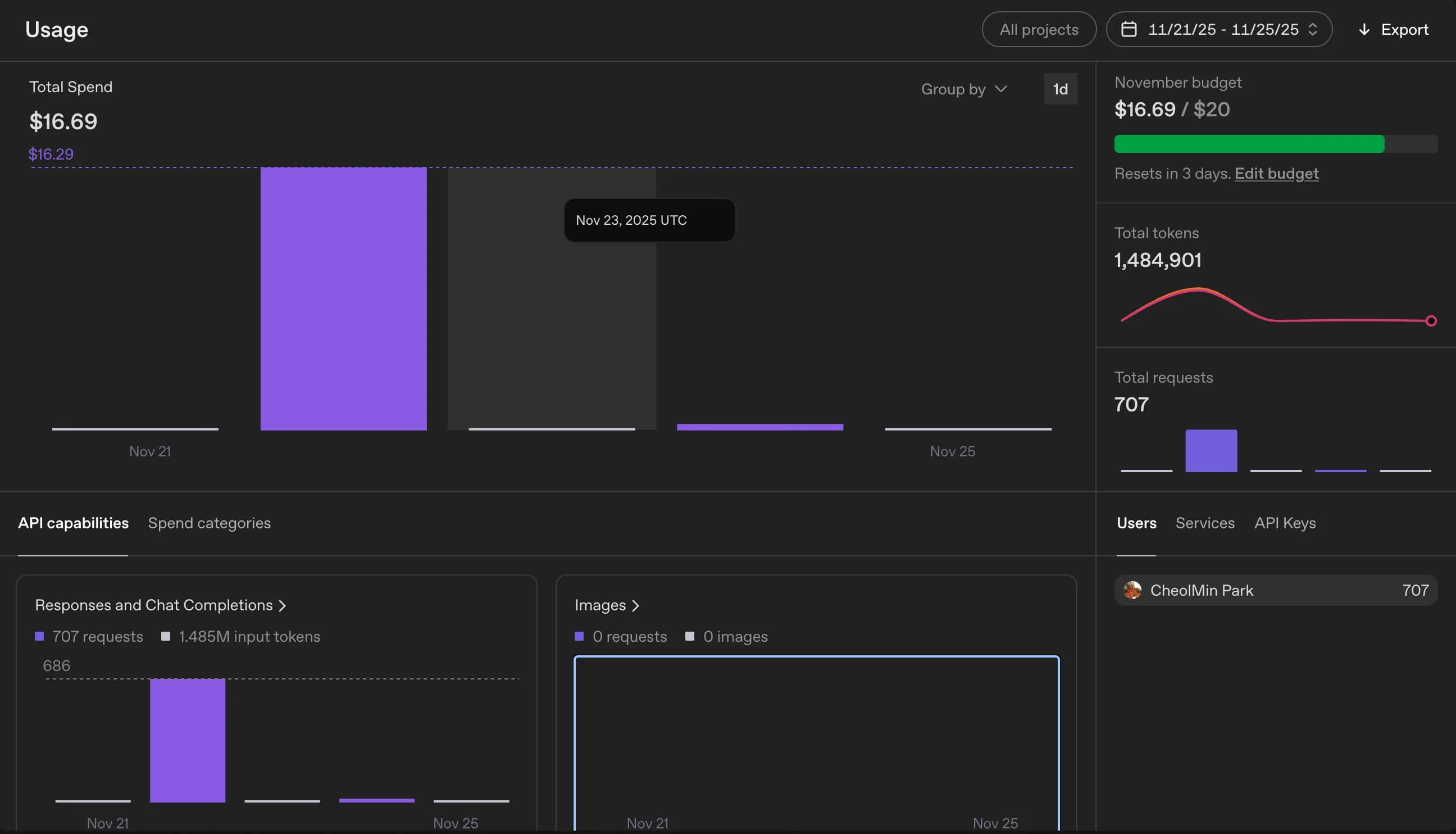
折合大约 24,000 韩元。
虽然用了 GPT-4o,但如果考虑翻译质量的话,这个价格还算可以接受。
4. 注册 sitemap.xml
最后要做的是修改 sitemap.xml。
原以为需要为每种语言单独生成 sitemap,结果发现通常只要在主域名的 sitemap 里把所有语言都列出来就行。
我大致以已发布的文章为基准来注册 sitemap。
...
export default async function sitemap(): Promise<MetadataRoute.Sitemap> {
  const posts = await prisma.post.findMany({
    where: { published: true },
    select: { id: true, slug: true, createdAt: true, updatedAt: true },
    orderBy: { updatedAt: "desc" },
  });

  const staticPages: MetadataRoute.Sitemap = locales.flatMap((locale) =>
    staticRoutes.map(({ path, changeFrequency, priority }) => ({
      url: buildLocalizedUrl(path, locale), // 我写的函数
      lastModified: new Date(),
      changeFrequency,
      priority,
    }))
  );
...
5. 后记
从决定做多语言服务到真正开始动手,中间纠结了 2 个月,但真正实现起来却不到 2~3 天。
果然任何事情都还是先做起来比较重要。
这次虽然只是通过多建一张表来大致解决问题,但我也意识到,一旦建好了 DB 并基于此开发了服务,之后再修改并不容易。
再次感受到 schema 和 DB 设计的重要性。
下次如果做别的项目,应该会先更加细致地检查 DB 设计。






댓글을 불러오는 중...