최근 블로그에 다국어 기능이 필요하다는 생각이 들었다.
그래서 next-intl을 이용해 다국어 서비스를 구현해보기로 했다.
1.i18n
먼저 다국어 서비스를 할 때는 지켜야 할 원칙들이 있다.
이걸 internationalization이라고 하는데, 무척 길기에 첫글자 i와 끝글자 n, 그리고 그 사이의 글자 18개를 합쳐 i18n이라고 한다.
1) i18n의 원칙들
(1) 문자열 하드코딩 금지
코드 안에 "회원가입" 같은 문자열을 직접 박지 않고 항상 메시지 키를 통해 가져온다.
예를들어 블로그 메인 페이지를 만든다고 해보자.
그럼 아래와 같이 만들 수 있다.
// components/Header.tsx
export function Header() {
  return (
    <header>
      <h1>지구과학 블로그</h1>
      <button>로그인</button>
      <button>회원가입</button>
    </header>
  );
}
하드코딩을 하면 언어별로 컴포넌트를 따로 만들어주어야 한다.
이것 보다는 언어, 지역벌로 분리된 리소스를 만들어 한번에 고칠 수 있게 해준다.
한국어는 ko.ts, 영어는 en.ts처럼 따로 분리된 리소스를 준비한다.
물론 json을 써도 괜찮다.
// locales/ko.ts
export const ko = {
  header: {
    title: '지구과학 블로그',
    login: '로그인',
    signup: '회원가입',
  },
};

// locales/en.ts
export const en = {
  header: {
    title: 'Earth Science Blog',
    login: 'Log in',
    signup: 'Sign up',
  },
};
해당 내용을 로케일에 따라 호출하면서 언어가 바뀔 수 있도록 한다.
(2) 파라미터 사용과 복수형 지원
"안녕하세요 힘캥님" 같은 내용은 `안녕하세요, ${name}님` 형태로 관리해서 이름만 바뀌게 해준다.
또한 영어는 1 comment, 2 comments 처럼 단수와 복수 구분되기 때문에, 이런 내용을 메세지 수준에서 처리해주어야 한다.
// locales/ko.ts
export const ko = {
  greeting: '안녕하세요, {name}님',
  comments: {
    zero: '아직 댓글이 없습니다.',
    one: '댓글이 1개 있습니다.',
    other: '댓글이 {count}개 있습니다.',
  },
};

// locales/en.ts
export const en = {
  greeting: 'Hello, {name}',
  comments: {
    zero: 'No comments yet.',
    one: 'There is 1 comment.',
    other: 'There are {count} comments.',
  },
};
(3) 날짜/숫자/통화 포맷 로케일별 처리
나라마다 날짜나 숫자를 표현하는 방법이 다양하다.
예를 들면 2025년 11월 27일을 2025-11-27 으로 표현할 수 있지만 27/11/2025 처럼 표현하기도 한다.
(4) locale negotiation과 기본값(fallback)
브라우저 언어, URL, 쿠키 등을 먼저 보고 지원되는 언어가 없다면 defaultLocale로 설정해준다.
(5)번역과 코드의 분리
개발자는 언어를 번역하는게 아니라 키만 이용한다.
번역가는 JSON이나 별도 툴을 통해 텍스트만 관리 하도록 한다.
2. next-intl
여러 라이브러리 중에서도 next-intl은 위의 i18n의 조건들을 만족하면서, 많은 사람들이 이용하고 있었다.
그래서 내 블로그에도 적용해 보기로 했다.
먼저 라이브러리를 설치해준다.
yarn add next-intl그리고 루트 폴더에 i18n/config.ts 파일을 만들어 준다.
// i18n/config.ts
export const defaultLocale = 'ko';
export const locales = ['ko', 'en', 'ja'] as const;
export type Locale = (typeof locales)[number];
그리고 i18n/request.ts 에 서버 컴포넌트에서 메세지를 가져오기 위한 함수도 하나 만든다.
// i18n/request.ts
import { getRequestConfig } from 'next-intl/server';
import { defaultLocale } from './config';

export default getRequestConfig(async ({ requestLocale }: { requestLocale: Promise<string | undefined> }) => {
  const locale = await requestLocale || defaultLocale;
  return {
    locale,
    messages: (await import(`./message/${locale}.json`)).default,
  };
});
그리고 message 폴더를 하나 만들어 언어별로 json 파일을 만들어준다.
만일 언어에 따른 json 파일이 없으면, 접속시 오류가 난다.
/messages
  ├── ko.json
  ├── en.json
  └── ja.json
해당 파일들은 같은 내부 구조를 가지고 있어야 한다.
개발자를 괴롭히고 싶다면 다른 구조로 만들어주자.
// ko.json
{
  "Home": {
    "title": "지구과학 블로그",
    "readMore": "더보기"
  }
}

// en.json
{
  "Home": {
    "title": "Earth Science Blog",
    "readMore": "Read more"
  }
}
이제 [locale] 폴더를 만들 차례.
App Router에서는 최상단 경로에 locale을 두는게 자연스럽다.
api나 locale이 필요없는 경로는 제외하면 된다.
app
 ├── [locale]
 │     ├── layout.tsx
 │     ├── page.tsx
 │     └── ... (기타 라우트들)
 └── layout.tsx
메인 layout.tsx에서는 원하는 설정들을 해주면 된다.
[locale]/layout.tsx에서는 아래와 같이 locale을 사용가능하도록 설정해준다.
// app/[locale]/layout.tsx
import { NextIntlClientProvider, getMessages } from 'next-intl';
import { locales } from '@/i18n/config';
import { notFound } from 'next/navigation';

export default async function LocaleLayout({ children, params }) {
  const { locale } = params;

  if (!locales.includes(locale)) {
    notFound(); // 404 처리
  }

  const messages = await getMessages();

  return (
    <html lang={locale}>
      <body>
        <NextIntlClientProvider messages={messages} locale={locale}>
          {children}
        </NextIntlClientProvider>
      </body>
    </html>
  );
}
여기서 getMessages() 함수가 locale에 따라 메세지를 불러오고, 이를 프로바이더로 뿌려준다.
이에 하위 컴포넌트에서는 lcoaled에 따라 메세지를 사용가능하다.
사용 예제를 한번 보자.
// 서버 컴포넌트
import { getTranslations } from 'next-intl/server';

export default async function Page() {
  const t = await getTranslations('Home');

  return <h1>{t('title')}</h1>;
}

// 클라이언트 컴포넌트
'use client';

import { useTranslations } from 'next-intl';

export default function ReadMoreButton() {
  const t = useTranslations('Home');

  return <button>{t('readMore')}</button>;
}
서버 컴포넌트에서는 getTranslation으로, 클라이언트 컴포넌트에서는 useTranslation으로 사용 가능하다.
metadata에서도 해당 방식으로 locale에 따라 값을 변경해줄 수 있다.
// app/[locale]/posts/[slug]/page.tsx
import { getTranslations } from 'next-intl/server';

export async function generateMetadata({ params }) {
  const t = await getTranslations({ locale: params.locale, namespace: 'Post' });

  return {
    title: t('metaTitle'),
    description: t('metaDescription')
  };
}
2. db shcema 변경
여기까지의 난이도는 그리 높지 않았다.
db를 변경해야 한다는 사실을 깨닫기 전 까지는 말이다.
내가 이용하던 기존의 db shcema는 아래와 같다.
model Post {
  id               String          @id @default(cuid())
  title            String
  processedContent String?         // 렌더링용 처리된 콘텐츠
  thumbnail        String?
  createdAt        DateTime        @default(now())
  updatedAt        DateTime?
  likes            Int             @default(0)
  categoryId       String?
  ....
}
모든 locale들이 likes, views를 공유할 수 있도록 하려고 하면 processedContent를 따로 분리해 locale에 따른 테이블을 하나 더 만들어야 했다.
post 자체에 locale에 따른 content 를 모두 넣기에는 테이블의 크기가 너무 커지고, 정규형에도 맞지 않았기 때문이다.
스키마를 바꾸는 것 자체는 쉽지 않았으나, post에서 내용을 분리해내는 순간 내 사이트의 글쓰기, 조회, 페이지네이션 등 모든 함수를 바꾸어야 했다.
그래서 그냥 점진적으로 바꿔 보기로 했다.
// Post는 그대로 두기
model Post {
  ....
}

model PostLocale {
  id               String   @id @default(cuid())
  postId           String
  locale           String
  title            String
  excerpt          String
  content          String
  ...

  post Post @relation(fields: [postId], references: [id], onDelete: Cascade)
}
두 테이블을 릴레이션으로 묶어 뒀으니, postid과 locale을 이용해 포스트를 다르게 반환하면 된다.
컴포넌트의 변경을 최소화하기 위해 기존에 쓰던 포스트 조회 함수와, locale을 이용해 포스트를 조회하는 함수의 출력 타입을 동일하게 만들어 주었다.
export async function getLocalizedPostBySlug(
  slug: string,
  locale: string
): Promise<PostContentProps | null> {
  // 포스트 조회
  const basePost = await getPostBySlug(slug);
  // 조회된 포스트 내용으로 locale에 맞는 포스트 조회
  const localeEntry = await prisma.postLocale.findFirst({
    where: {
      postId: basePost.id as string,
      locale,
    },
  });

  const localizedContent = localeEntry.processedContent || localeEntry.content;
  // 조회된 내용 반환
  return {
    ...basePost,
    title: localeEntry.title,
    excerpt: localeEntry.excerpt,
    category: localeEntry.category ?? basePost.category,
    content: localeEntry.content,
  };
}
그리고 포스팅 조회에서도 해당 내용을 반영해 주었다.
export default async function PostPage({
  params,
}: {
  params: Promise<{ slug: string }>;
}) {
  const { slug } = await params;
  const locale = await getLocale();
  const post =
    locale !== "ko"
      ? await getLocalizedPostBySlug(slug, locale)
      : await getPostBySlug(slug);
  ...
}
이제는 글들을 번역해서 db에 넣기만 하면 된다.
3. Vercel AI SDK를 이용한 번역
파이썬으로도 구현 가능하지만, 순수 타입 스크립트를 쓰고 싶어서 Vercel AI SDK를 이용하기로 했다.
Generate Text라는걸 이용하면 API를 이용해 생성된 내용을 받을 수 있다.
import { PrismaClient } from "@prisma/client";
import { generateText } from "ai";
import { openai } from "@ai-sdk/openai";

const prisma = new PrismaClient();

const TARGET_LOCALES = ["en", "zh", "ja", "es"] as const;

async function translatePost(post: {
  id: string;
  title: string;
  content: string;
}) {
  ...
  // 포스트 조회
  for (const locale of TARGET_LOCALES) {
    const exists = await prisma.postLocale.findUnique({
      where: {
        postId_locale: {
          postId: post.id,
          locale,
        },
      },
    });
    // 출력될 형식을 미리 지정
    const payload = JSON.stringify({
      targetLocale: locale,
      title: post.title,
      content: post.content,
    });

    const { text } = await generateText({
      model: openai("gpt-5.1"),
      // 프롬프트 설정
      system:
        "You are a professional translator. Translate the JSON fields `title` and `content` into `targetLocale`. Preserve HTML tags, Markdown, code blocks, links, and inline styles exactly as-is; only translate the human-readable text. Keep technical terms and product names unless a well-known localized form exists. Return the translated JSON with the same keys and no extra commentary.",
      prompt: payload,
    });
    // text에 '''와 같은 글자가 있어서 실제로 쓸 때는 이스케이프 필요함.
    const json = JSON.parse(text);

    await prisma.postLocale.create({
      data: {
        postId: post.id,
        locale,
        title: json.title || post.title,
        content: json.content || post.content,
        category: json.category || null,
        // 내용 생략
      },
    });
    results[locale] = json;
  }
  return results;
}
이렇게 포스팅 170개 정도를 4개국어로 번역하는데 1시간이 넘게 걸린듯 하다.
그렇게 들어간 API 비용은 총 16.69 달러.
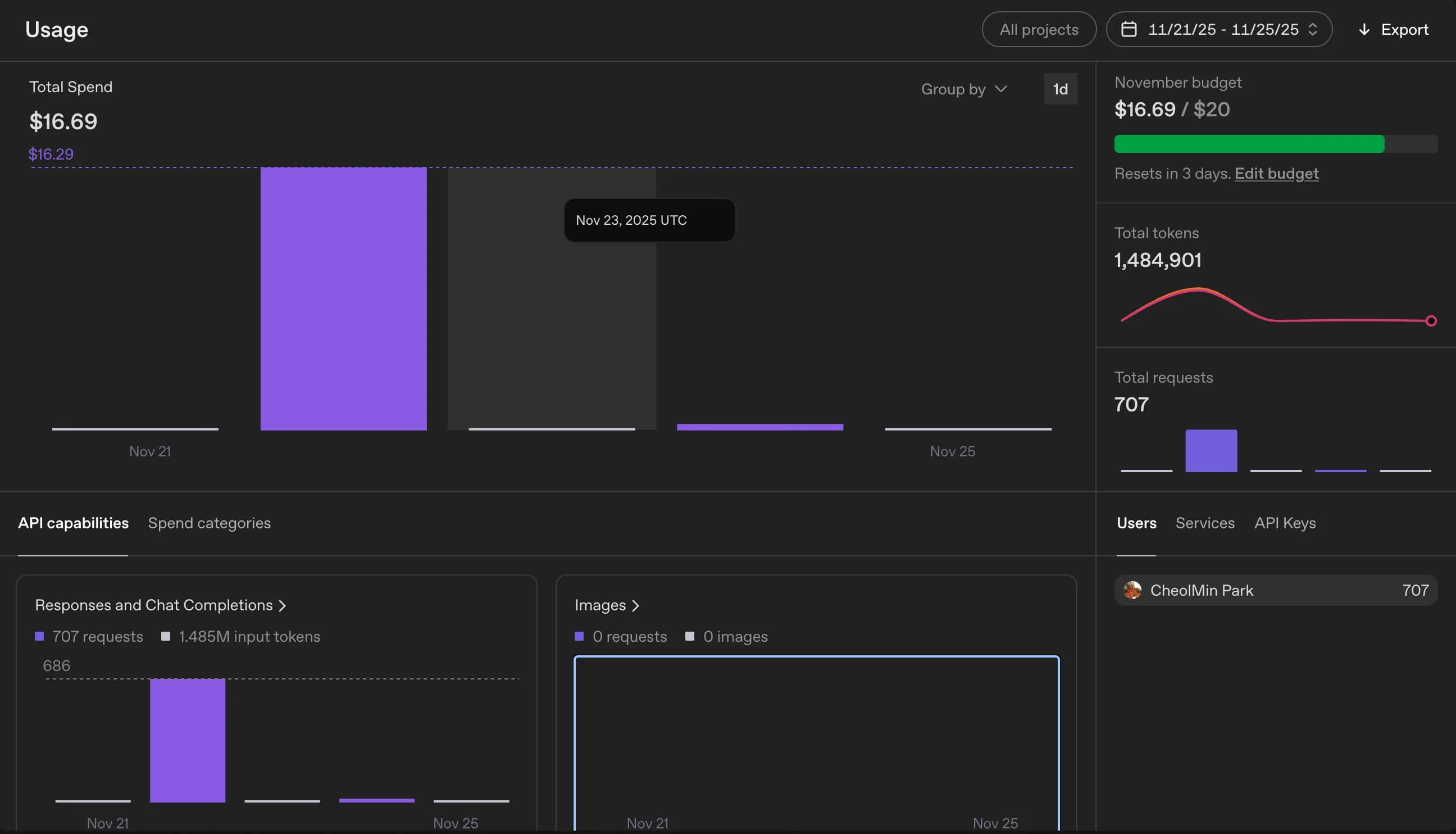
환산해보면 24,000원 정도이다.
GPT-4o를 써서 그렇지만, 그래도 번역물의 퀄이 좋을 것이라 생각하면 괜찮은 편인듯 하다.
4. sitemap.xml 등록
이제 마지막으로 sitemap.xml을 변경해주면 된다.
언어별로 사이트맵을 따로 해줘야 할 줄 알았는데, 그냥 메인 도메인의 사이트맵에 전부 적어주는게 일반적이라고 한다.
대충 출판된 글들을 기준으로 사이트맵을 등록해 주었다.
...
export default async function sitemap(): Promise<MetadataRoute.Sitemap> {
  const posts = await prisma.post.findMany({
    where: { published: true },
    select: { id: true, slug: true, createdAt: true, updatedAt: true },
    orderBy: { updatedAt: "desc" },
  });

  const staticPages: MetadataRoute.Sitemap = locales.flatMap((locale) =>
    staticRoutes.map(({ path, changeFrequency, priority }) => ({
      url: buildLocalizedUrl(path, locale), // 내가 만든 함수
      lastModified: new Date(),
      changeFrequency,
      priority,
    }))
  );
...
5. 후기
다국어 서비스를 하고자 마음먹고 고민한게 2달이었는데, 실제로 구현하는데는 2~3일이 채 걸리지 않았다.
역시 뭐든 일단 해보는게 중요한 것 같다.
이번에는 테이블을 하나 더 만드는 것으로 대충 해결했지만, DB를 한번 만들고 이에 맞게 서비스를 제작하면 이후 변경하는게 쉽지 않은 일이란걸 깨달았다.
스키마와 DB 설계의 중요성을 다시한번 느꼈다.
다음번에 다른 프로젝트를 한다면, 먼저 DB 설계부터 세심하게 점검할 것 같다.






댓글을 불러오는 중...