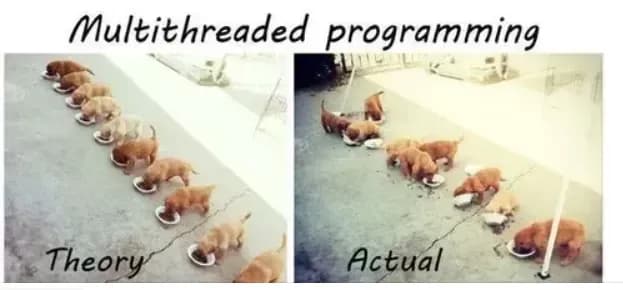
파이썬으로 코딩을 하다보면 tkinter와 같은 GUI를 구현할 때 문제에 부딪치게 된다.
버튼을 눌러 특정 함수를 실행하면 GUI도 같이 멈춰버리는 것.
그래서 이걸 멀티 스레딩으로 해결해보기로 했다.
1. 멀티 스레딩? 멀티 프로세싱?
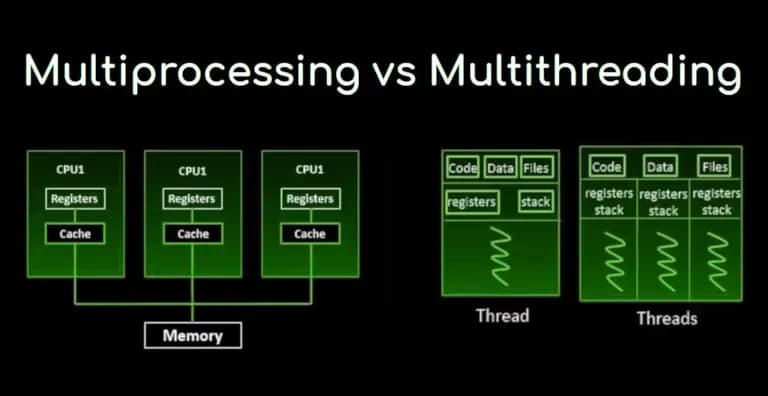
멀티 스레딩은 하나의 프로세스 안에서 여러 개의 작업 흐름(스레드)을 동시에 실행하는 기법이다.
예를 들어, tkinter로 만든 GUI가 메인 스레드에서 돌아가고 있을 때, 버튼을 눌러 실행되는 함수가 시간이 오래 걸린다면 GUI도 같이 멈춰버린다.
학교에서 근무하는 사람들이라면 모두 아는 UNIV(유니브)와 같은 입시 프로그램이 프로그램이 그 예시다.
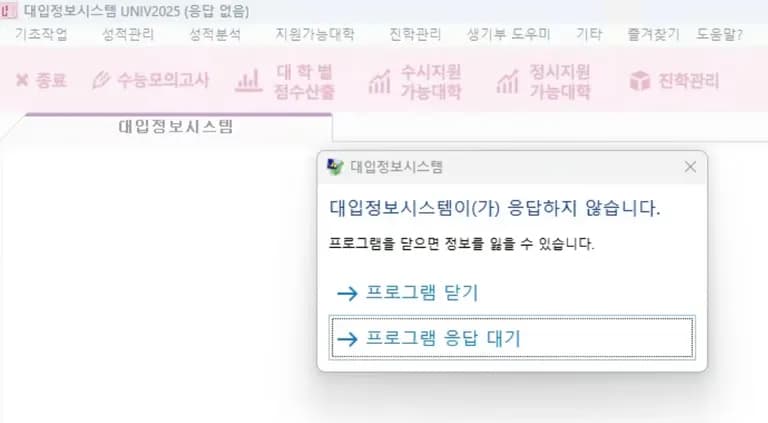
특정 창을 열면 원래 있던 창이 멈춰버리는데, GUI 구성은 사용자들에게 무척 불편함을 안겨준다.
이럴 때 버튼 클릭으로 실행되는 함수를 별도의 스레드에 실행시키면 GUI는 메인 스레드에서 계속 돌아가고, 다른 스레드에서 함수가 실행되므로 화면이 멈추지 않는다.
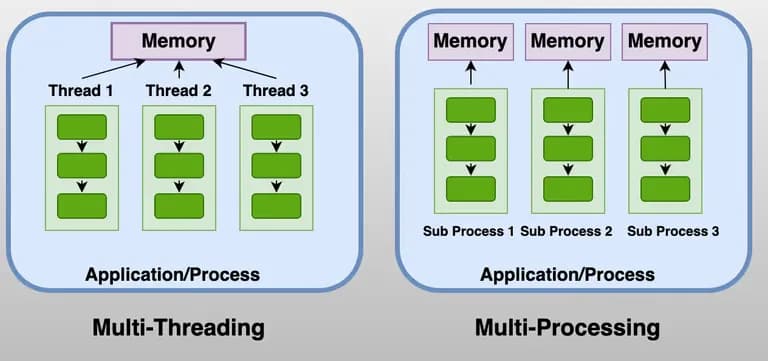
반면, 멀티 프로세싱은 아예 다른 프로세스를 생성해 실행하는 방식이다.
스레딩은 하나의 프로세스 안에서 메모리를 공유하면서 실행되지만, 멀티 프로세싱은 프로세스를 복제해 독립적인 메모리 공간에서 실행된다.
CPU 코어를 여러 개 활용할 수 있어 계산량이 큰 작업에는 유리하지만, GUI 프로그램에서는 별도의 프로세스 간 통신이 필요해 스레딩만큼 간단하게 사용할 수 없다.
구분 | 멀티 스레딩 | 멀티 프로세싱 |
|---|---|---|
실행 방식 | 하나의 프로세스 내 여러 스레드 | 여러 개의 독립 프로세스 |
메모리 | 메모리 공간 공유 | 메모리 공간 독립 (복제) |
CPU 활용 | GIL(Global Interpreter Lock) 때문에 CPU-bound 작업에는 제약 | CPU 코어를 여러 개 사용 가능 |
GUI와의 관계 | GUI 멈춤 방지에 적합 | GUI와는 별개 프로세스라 통신 필요 |
사용 예시 | tkinter 버튼 클릭 후 함수 실행 | 이미지 처리, 대규모 계산 등 |
파이썬에서 멀티 프로세싱이 가능한 이유는, multiprocessing 라이브러리를 통해 프로세스를 복제하거나 새로 생성하여 실행할 수 있기 때문이다.
하지만 메모리는 프로세스마다 독립적이라, 데이터를 공유하려면 Queue, Pipe, 공유 메모리 등을 사용해야 한다.
즉, GUI 프로그램처럼 사용자 인터페이스가 멈추지 않아야 하는 경우에는 멀티 스레딩을, 대용량 계산 작업에는 멀티 프로세싱을 적절히 활용하는 것이 좋다.
2. 멀티 스레딩 코드 예제
예를들어 아래와 같은 코드가 있다고 하자.
이 코드는 넣어준 숫자만큼 hello, hi를 출력하는 코드이다.
import time

def printHello(num):
    for i in range(num):
        print(f'hello-{i}')
        time.sleep(1)

def printHi(num):
    for i in range(num):
        print(f'hi-{i}')
        time.sleep(1)

printHello(3)
printHi(2)
맨 아랫줄 처럼 코드를 실행하면, Hello가 3번 나온뒤 Hi가 2번 나온다.
파이썬은 동기실행 함수이기 때문에 하나의 함수가 모두 끝날 때 까지 다음 함수가 실행되지 않고 대기하기 때문이다.
hello-0
hello-1
hello-2
hi-0
hi-1
이제 이걸 멀티 스레딩으로 구현해보자.
printHello와 printHi는 위와 같으며, 코드에 대한 간단한 설명은 주석으로 달아 놓았다.
import threading
import time

...

hello = threading.Thread(target=printHello, args=(3, ), daemon=True)
hello.start()
hi = threading.Thread(target=printHi, args=(2, ), daemon=True)
hi.start()
hello.join()
hi.join()
print('작업종료')
이렇게 실행하면 hello와 hi가 1초 간격으로 동시에 출력된다.
그리고 마지막 hello 출력 후, 작업 종료가 출력된다.
hello-0hi-0
hello-1hi-1
hello-2
작업종료
여기서 Thread의 파라미터에서 중요한 것만 적으면 아래와 같다.
daemon은 보통 true로 두는게 정신건강에 좋다.
옵션 | 설명 | 예시 |
|---|---|---|
| 실행할 대상 함수 |
|
| 함수에 전달할 파라미터 (튜플) |
|
| 데몬 스레드 여부. |
|
3. threading말고 futures을 쓰라고?
threading은 사용이 그리 어렵지는 않지만, daemon, join등을 해주는 과정이 필요하다.
파이썬 3.2 부터는 concurrent.futures라는 라이브러리를 지원하는데, 이걸 이용하면 조금 더 간단하게 구현이 가능하다.
import time
from concurrent.futures import ThreadPoolExecutor

def printHello(num, name):
    for i in range(num):
        print(f'{name}-hello-{i}')
        time.sleep(1)

def printHi(num, name):
    for i in range(num):
        print(f'{name}-hi-{i}')
        time.sleep(1)

executor = ThreadPoolExecutor(max_workers=2)

future1 = executor.submit(printHello, 5, "Alice")
future2 = executor.submit(printHi, 5, "Bob")

future1.result()
future2.result()

print("모든 작업 완료")
submit의 파라미터로 단순하게 함수, 그리고 함수 내부에 들어갈 파라미터들을 순서대로 넣어주기만 하면 된다.
submit 시점에서 함수 실행은 시작되며, result를 호출하면 함수가 끝날 때까지 기다리고 return 값을 받을 수 있다.
result를 호출하지 않으면 메인 스레드가 기다리지 않아 프로그램이 먼저 종료될 수도 있다.
기본적으로 내부에 daemon이 선언되어 있기 때문에 따로 선언할 필요는 없다.
threading보다는 조금 더 직관적이다.
메모리 누수 방지를 위해 아래와 같이 with 구문으로 감싸줄 수도 있다.
with ThreadPoolExecutor(max_workers=2) as executor:
    future1 = executor.submit(printHello, 5, "Alice")
    future2 = executor.submit(printHi, 5, "Bob")

    future1.result()
    future2.result()
with 구문은 executor.shutdown(wait=True)를 자동으로 호출하여 안전하게 스레드를 종료해 준다.
4. GUI와 함수 동시실행 예제
이제 간단한 GUI와 함수를 동시에 실행해보자.
GUI는 customtkinter를 사용할 것이다.
함수는 그냥 간단하게 위에서 한 것과 같이 printHello, printHi를 이용해 구현해보려고 한다.
아래 처럼 클래스를 구현해 보았다.
from concurrent.futures import ThreadPoolExecutor
import time
import customtkinter as ctk

class helloHiWindow:
    def __init__(self):
        self.hello = 5
        self.hi = 6
        self.app = ctk.CTk()
        self.executor = ThreadPoolExecutor(max_workers=2)
        self.customWindow()

    def run(self):
        self.app.mainloop()

    def customWindow(self):
        self.app.title("Hello! Hi!")
        self.app.geometry("300x200")
        button1 = ctk.CTkButton(self.app, text="Hello!", height=10, command=self.startHello)
        button1.pack(pady=20)
        button2 = ctk.CTkButton(self.app, text="Hi!", height=10, command=self.startHi)
        button2.pack(pady=20)

    def startHello(self):
        hello = self.executor.submit(self.printHello)

    def startHi(self):
        hi = self.executor.submit(self.printHi)

    def printHello(self):
        for i in range(self.hello):
            print(f'hello-{i}')
            time.sleep(1)

    def printHi(self):
        for i in range(self.hi):
            print(f'hi-{i}')
            time.sleep(1)


if __name__ == "__main__":
    app = helloHiWindow()
    app.run()
혹시 맥북을 쓴다면 brew install python-tk로 라이브러리를 하나 설치해주어야 한다.
이렇게 만든 뒤 창을 실행해보면 아래와 같이 창이 뜬다.
버튼을 하나씩 클릭하면 출력이 뜬다.
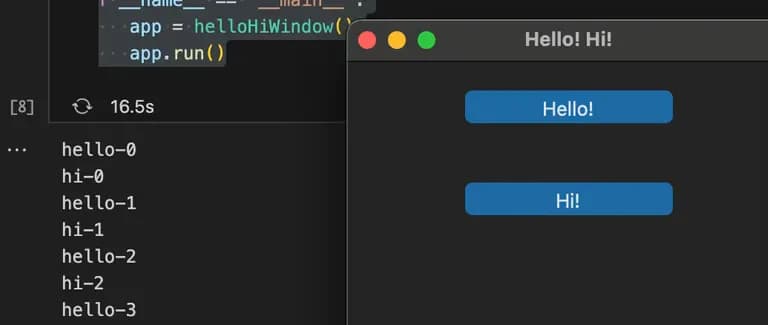
버튼을 마구 클릭해도 기존에 있던 창은 멈추지 않는다.
메인 스레드에서 창이 돌아가고, print 함수는 서브스레드로 따로 빼주었기 때문이다.
이런 방식으로 창은 멈추지 않고, 함수는 실행하도록 만들 수 있다.
5. 이렇게 구현한게 실제 멀티스레딩이 아니라고...?
파이썬에는 GIL(Global Interpreter Lock)라고 부르는 것이 있어서 동시에 두개 이상의 스레드가 cpu에서 실행할 수 없다.
이는 파이썬의 속도 향상, 개발 안정성 확보를 위해 만들어 졌다고 한다.
그런데 위의 코드는 실행해보면 동시에 실행되는 것처럼 보인다.

이는 파이썬 코드가 하나의 스레드에서 빠르게 번갈아가면서 실행되기 때문이다.
마치 자바스크립트의 이벤트 루프와 비슷하다.
time.sleep(1)과 같은 함수는 cpu를 점유하지 않고 대기 하고, 그 동안 다른 필요한 함수를 처리하는 방식이다.
이런 방식으로 실제는 하나의 스레드지만, 여러개의 스레드가 존재하는 것처럼 보여지게 만든다.
6. 후기
처음 파이썬을 배울때 멀티 스레딩(멀티 테스킹)이라는 개념이 다소 생소하고 어렵게 느껴졌다.
그래서 단순하게 터미널 창만 띄워서 이용 했었는데, 개발 단계로 들어가기 시작하니 터미널의 검은 창이 너무 어렵게 느껴지게 되면서 처음으로 customtkinter로 GUI를 구현해 보았다.
그리고 그렇게 만드는 과정에서 멀티 스레딩에 대해 확실하게 알게 되었다.
프로그래밍은 강연이나 수업을 듣는 것보다, 프로젝트를 하나 해결해 나가면서 얻는게 더 많다.
앞으로도 꾸준하게 프로젝트를 진행해 보아야 겠다.


댓글을 불러오는 중...