最近、ブログに多言語対応機能が必要だと感じた。
そこで next-intl を使って多言語サービスを実装してみることにした。
1.i18n
まず多言語サービスを行うときには、守るべき原則がある。
これを internationalization と呼ぶが、かなり長いので、先頭の i と末尾の n、そしてその間の 18 文字を合わせて i18n と表記する。
1) i18n の原則
(1) 文字列のハードコーディング禁止
コードの中に「会員登録」のような文字列を直接書かず、常にメッセージキーを通じて取得する。
例えば、ブログのメインページを作るとしよう。
その場合、次のように作れる。
// components/Header.tsx
export function Header() {
  return (
    <header>
      <h1>地球科学ブログ</h1>
      <button>ログイン</button>
      <button>会員登録</button>
    </header>
  );
}
ハードコーディングしてしまうと、言語ごとにコンポーネントを別々に作る必要が出てくる。
それよりは言語・地域ごとに分離されたリソースを作り、一括で修正できるようにする。
韓国語は ko.ts、英語は en.ts のように、分離されたリソースを用意する。
もちろん JSON を使っても構わない。
// locales/ko.ts
export const ko = {
  header: {
    title: '지구과학 블로그',
    login: '로그인',
    signup: '회원가입',
  },
};

// locales/en.ts
export const en = {
  header: {
    title: 'Earth Science Blog',
    login: 'Log in',
    signup: 'Sign up',
  },
};
これらの内容をロケールに応じて呼び出し、言語が切り替わるようにする。
(2) パラメータの利用と複数形対応
"안녕하세요 힘캥님" のような内容は、`안녕하세요, ${name}님` という形で管理し、名前だけが変わるようにする。
また英語では 1 comment, 2 comments のように単数と複数が区別されるため、このような内容はメッセージのレベルで処理しておく必要がある。
// locales/ko.ts
export const ko = {
  greeting: '안녕하세요, {name}님',
  comments: {
    zero: '아직 댓글이 없습니다.',
    one: '댓글이 1개 있습니다.',
    other: '댓글이 {count}개 있습니다.',
  },
};

// locales/en.ts
export const en = {
  greeting: 'Hello, {name}',
  comments: {
    zero: 'No comments yet.',
    one: 'There is 1 comment.',
    other: 'There are {count} comments.',
  },
};
(3) 日付・数値・通貨フォーマットのロケール別処理
国ごとに日付や数字の表現方法はさまざまだ。
例えば 2025年11月27日を 2025-11-27 と表現することもあれば、27/11/2025 のように表現することもある。
(4) locale negotiation とデフォルト値(fallback)
ブラウザの言語、URL、クッキーなどをまず参照し、対応する言語がなければ defaultLocale に設定する。
(5) 翻訳とコードの分離
開発者は言語を翻訳するのではなく、キーだけを利用する。
翻訳者は JSON や別ツールを使ってテキストだけを管理できるようにする。
2. next-intl
いくつかライブラリがある中でも、next-intl は上記の i18n の条件を満たしつつ、多くの人に利用されていた。
そこで自分のブログにも適用してみることにした。
まずライブラリをインストールする。
yarn add next-intlそしてルートフォルダに i18n/config.ts ファイルを作成する。
// i18n/config.ts
export const defaultLocale = 'ko';
export const locales = ['ko', 'en', 'ja'] as const;
export type Locale = (typeof locales)[number];さらに、i18n/request.ts にサーバーコンポーネントからメッセージを取得するための関数を 1 つ作る。
// i18n/request.ts
import { getRequestConfig } from 'next-intl/server';
import { defaultLocale } from './config';

export default getRequestConfig(async ({ requestLocale }: { requestLocale: Promise<string | undefined> }) => {
  const locale = await requestLocale || defaultLocale;
  return {
    locale,
    messages: (await import(`./message/${locale}.json`)).default,
  };
});
そして message フォルダを 1 つ作り、言語ごとに JSON ファイルを作成する。
もし言語に対応する JSON ファイルがなければ、アクセス時にエラーになる。
/messages
  ├── ko.json
  ├── en.json
  └── ja.json
これらのファイルは同じ内部構造を持っている必要がある。
開発者を困らせたいなら、あえて別の構造にしてみよう。
// ko.json
{
  "Home": {
    "title": "지구과학 블로그",
    "readMore": "더보기"
  }
}

// en.json
{
  "Home": {
    "title": "Earth Science Blog",
    "readMore": "Read more"
  }
}
次は [locale] フォルダを作成する番だ。
App Router では、最上位のパスに locale を置くのが自然だ。
api や locale が不要なパスは除外して構わない。
app
 ├── [locale]
 │     ├── layout.tsx
 │     ├── page.tsx
 │     └── ... (その他のルート)
 └── layout.tsx
メインの layout.tsx では、必要な設定を行えばよい。
[locale]/layout.tsx では、次のようにして locale を利用可能に設定する。
// app/[locale]/layout.tsx
import { NextIntlClientProvider, getMessages } from 'next-intl';
import { locales } from '@/i18n/config';
import { notFound } from 'next/navigation';

export default async function LocaleLayout({ children, params }) {
  const { locale } = params;

  if (!locales.includes(locale)) {
    notFound(); // 404 처리
  }

  const messages = await getMessages();

  return (
    <html lang={locale}>
      <body>
        <NextIntlClientProvider messages={messages} locale={locale}>
          {children}
        </NextIntlClientProvider>
      </body>
    </html>
  );
}
ここで getMessages() 関数が locale に応じてメッセージを読み込み、それをプロバイダ経由で配布してくれる。
これにより、子コンポーネントでは locale に応じてメッセージを利用できる。
使用例を見てみよう。
// 서버 컴포넌트
import { getTranslations } from 'next-intl/server';

export default async function Page() {
  const t = await getTranslations('Home');

  return <h1>{t('title')}</h1>;
}

// 클라이언트 컴포넌트
'use client';

import { useTranslations } from 'next-intl';

export default function ReadMoreButton() {
  const t = useTranslations('Home');

  return <button>{t('readMore')}</button>;
}
サーバーコンポーネントでは getTranslations を、クライアントコンポーネントでは useTranslations を使うことができる。
metadata でも同じ方式で、locale によって値を変更できる。
// app/[locale]/posts/[slug]/page.tsx
import { getTranslations } from 'next-intl/server';

export async function generateMetadata({ params }) {
  const t = await getTranslations({ locale: params.locale, namespace: 'Post' });

  return {
    title: t('metaTitle'),
    description: t('metaDescription')
  };
}
2. DB スキーマの変更
ここまでの難易度はそれほど高くなかった。
DB を変更しなければならない事実に気づくまでは。
自分が使っていた既存の DB スキーマは次の通りだ。
model Post {
  id               String          @id @default(cuid())
  title            String
  processedContent String?         // 렌더링용 처리된 콘텐츠
  thumbnail        String?
  createdAt        DateTime        @default(now())
  updatedAt        DateTime?
  likes            Int             @default(0)
  categoryId       String?
  ....
}
すべての locale で likes や views を共有できるようにしようとすると、processedContent を切り離して、locale ごとのテーブルをもう 1 つ作る必要があった。
post 自体に locale ごとの content をすべて詰め込むにはテーブルが大きくなりすぎるし、正規形にも合わないからだ。
スキーマを変えること自体は難しくなかったが、post から内容を切り出した瞬間、自分のサイトの投稿、閲覧、ページネーションなど、すべての関数を変更しなければならなかった。
そこで、とりあえず段階的に変えていくことにした。
// Post는 그대로 두기
model Post {
  ....
}

model PostLocale {
  id               String   @id @default(cuid())
  postId           String
  locale           String
  title            String
  excerpt          String
  content          String
  ...

  post Post @relation(fields: [postId], references: [id], onDelete: Cascade)
}
2 つのテーブルをリレーションで結んでおいたので、postId と locale を使ってポストを出し分ければよい。
コンポーネントの変更を最小限にするため、既存のポスト取得関数と、locale を利用してポストを取得する関数の返却型を同じにしておいた。
export async function getLocalizedPostBySlug(
  slug: string,
  locale: string
): Promise<PostContentProps | null> {
  // 포스트 조회
  const basePost = await getPostBySlug(slug);
  // 조회된 포스트 내용으로 locale에 맞는 포스트 조회
  const localeEntry = await prisma.postLocale.findFirst({
    where: {
      postId: basePost.id as string,
      locale,
    },
  });

  const localizedContent = localeEntry.processedContent || localeEntry.content;
  // 조회된 내용 반환
  return {
    ...basePost,
    title: localeEntry.title,
    excerpt: localeEntry.excerpt,
    category: localeEntry.category ?? basePost.category,
    content: localeEntry.content,
  };
}
そして投稿の閲覧処理にもこの内容を反映した。
export default async function PostPage({
  params,
}: {
  params: Promise<{ slug: string }>;
}) {
  const { slug } = await params;
  const locale = await getLocale();
  const post =
    locale !== "ko"
      ? await getLocalizedPostBySlug(slug, locale)
      : await getPostBySlug(slug);
  ...
}
これで、記事を翻訳して DB に入れさえすればよくなった。
3. Vercel AI SDK を使った翻訳
Python でも実装は可能だが、純粋な TypeScript を使いたかったので Vercel AI SDK を使うことにした。
Generate Text というものを使うと、API 経由で生成された内容を受け取ることができる。
import { PrismaClient } from "@prisma/client";
import { generateText } from "ai";
import { openai } from "@ai-sdk/openai";

const prisma = new PrismaClient();

const TARGET_LOCALES = ["en", "zh", "ja", "es"] as const;

async function translatePost(post: {
  id: string;
  title: string;
  content: string;
}) {
  ...
  // 포스트 조회
  for (const locale of TARGET_LOCALES) {
    const exists = await prisma.postLocale.findUnique({
      where: {
        postId_locale: {
          postId: post.id,
          locale,
        },
      },
    });
    // 출력될 형식을 미리 지정
    const payload = JSON.stringify({
      targetLocale: locale,
      title: post.title,
      content: post.content,
    });

    const { text } = await generateText({
      model: openai("gpt-5.1"),
      // 프롬프트 설정
      system:
        "You are a professional translator. Translate the JSON fields `title` and `content` into `targetLocale`. Preserve HTML tags, Markdown, code blocks, links, and inline styles exactly as-is; only translate the human-readable text. Keep technical terms and product names unless a well-known localized form exists. Return the translated JSON with the same keys and no extra commentary.",
      prompt: payload,
    });
    // text에 '''와 같은 글자가 있어서 실제로 쓸 때는 이스케이프 필요함.
    const json = JSON.parse(text);

    await prisma.postLocale.create({
      data: {
        postId: post.id,
        locale,
        title: json.title || post.title,
        content: json.content || post.content,
        category: json.category || null,
        // 내용 생략
      },
    });
    results[locale] = json;
  }
  return results;
}
このように、投稿約 170 件を 4 か国語に翻訳するのに 1 時間以上かかったように思う。
そのときにかかった API コストは合計 16.69 ドル。
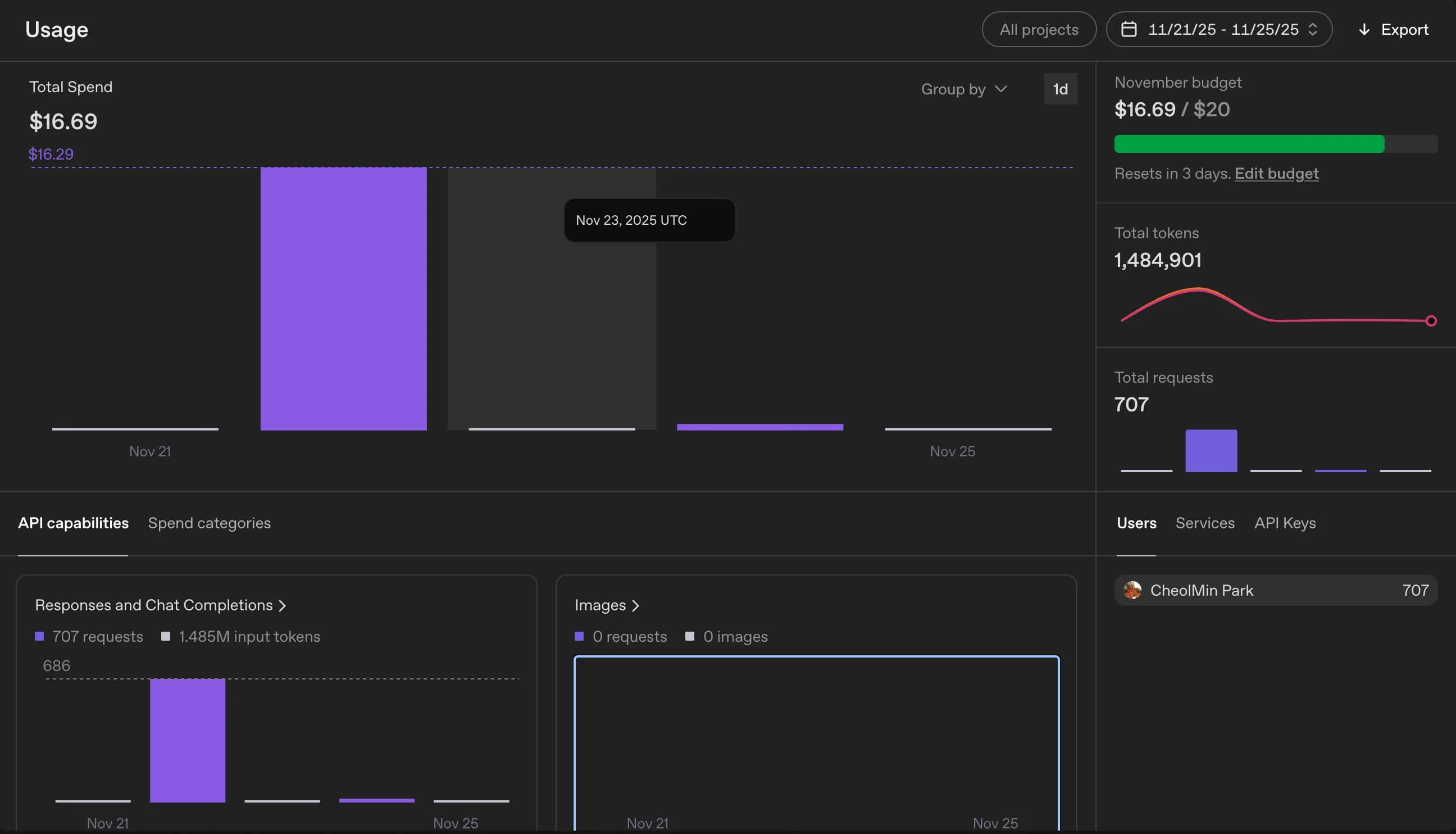
日本円に換算するとおよそ 24,000 ウォンほどだ。
GPT-4o を使ったせいでもあるが、それでも翻訳物のクオリティを考えると悪くないと思う。
4. sitemap.xml の登録
あとは最後に sitemap.xml を変更すればよい。
言語別にサイトマップを分ける必要があるのかと思っていたが、メインドメインのサイトマップにすべて記載するのが一般的らしい。
ざっくりと公開済みの記事を基準にサイトマップを登録した。
...
export default async function sitemap(): Promise<MetadataRoute.Sitemap> {
  const posts = await prisma.post.findMany({
    where: { published: true },
    select: { id: true, slug: true, createdAt: true, updatedAt: true },
    orderBy: { updatedAt: "desc" },
  });

  const staticPages: MetadataRoute.Sitemap = locales.flatMap((locale) =>
    staticRoutes.map(({ path, changeFrequency, priority }) => ({
      url: buildLocalizedUrl(path, locale), // 내가 만든 함수
      lastModified: new Date(),
      changeFrequency,
      priority,
    }))
  );
...
5. 所感
多言語サービスをやろうと思い立ってから 2 か月悩んだが、実際に実装するのには 2〜3 日もかからなかった。
やはり何事も、とりあえずやってみることが大事だと感じた。
今回はテーブルを 1 つ増やすことでとりあえず解決したが、いったん DB を作り、それに合わせてサービスを作ってしまうと、その後に変更するのは簡単ではないということを痛感した。
スキーマと DB 設計の重要性を改めて感じた。
次に別のプロジェクトをやるときは、まず DB 設計から丁寧に見直すことになりそうだ。






댓글을 불러오는 중...