On my MacBook, 'Open With' was showing multiple versions of VS Code.
While it doesn't affect functionality, it's unsettling.

Enter the following command in Terminal:
/System/Library/Frameworks/CoreServices.framework/Frameworks/LaunchServices.framework/Support/lsregister -kill -r -domain local -domain system -domain userThis command resets the MacBook's Launch Services.
/System/Library/Frameworks/CoreServices.framework/Frameworks/LaunchServices.framework/Support/lsregister
# Path to the utility that manages the Launch Services database

-kill
# Forces the termination of the Launch Services database

-r
# Reloads the database

-domain local
# Updates the Launch Services database for the local domain

-domain system
# Updates the Launch Services database for the system domain

-domain user
# Updates the Launch Services database for the user domain
After executing this command, you’ll see that only one instance of VS Code remains in 'Open With'.
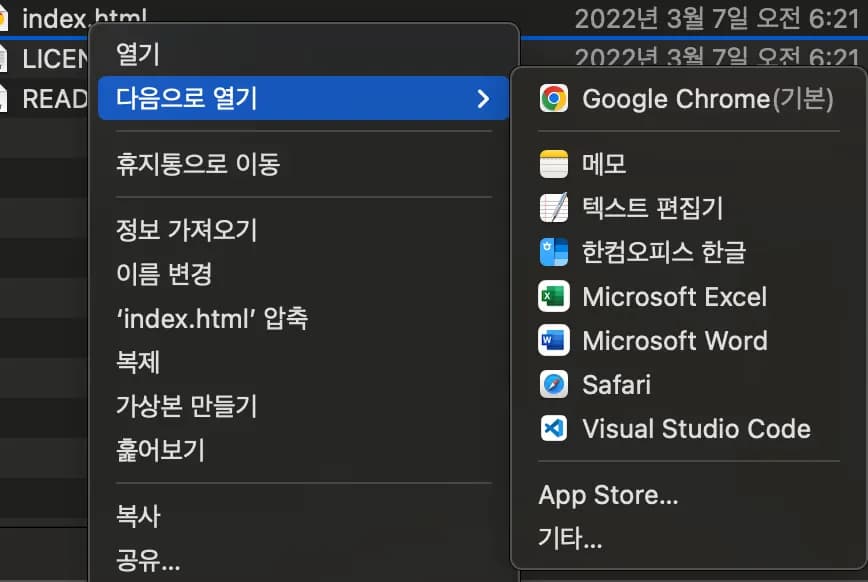
The issue is that this needs to be done whenever VS Code updates....
If there's a fundamental solution, please comment.






댓글을 불러오는 중...